Monday, August 31, 2015

Using Mini-Rubrics to Provide Feedback in Schoology

By Kim Miklusak

I'm excited to use rubrics in Schoology this year.  As I mentioned on my other blog [shameless plug], I'm looking forward to working with mini-lessons on skill-specific assignments that target what each student needs to be successful in larger reading and writing assignments.

The tricky thing on Schoology is where and how to set up the rubrics.  There are many websites and videos for setting up and using them.  If you're looking to start small, I recommend setting up a few generic ones.  For example, I have one set up for "journals."  I'm not grading all of my discussions in our actual gradebook, but I do want to provide students with targeted feedback on the depth of their responses to encourage them to give enough detail to explain their point of view.

Discussion topic & rubric
Grading view of a discussion on web browser
Grading view of a discussion on Schoology app

There are pluses and minuses to grading on the app vs. website.  The website allows you to clearly see which students' submissions have been graded, but it takes 4 clicks to finally submit the rubric.  The app is much quicker, a really nice interface, but it's hard to see which submissions have been graded--not a problem if you just move down the list and check every student, though.

Grading assignments with the Schoology rubric is so smooth on both the app and website.  This will be so helpful in giving immediate and detailed feedback to students on specific skills.

Grading view of an assignment on Schoology app

Please share ways you have used skill-specific rubrics in the comments below.  And please stop down to the CollabLab if you are interested in setting these up or would like to discuss more ways to use them in class!

Thursday, August 27, 2015

Reflecting on Freshmen First Days


Over the past couple of days I got to be a part of the freshman first days and worked with new students on digital citizenship, team building, and learning the in-and-outs of Notability. The new freshman brought a lot of fresh energy and I feel that the extra preparation over the last couple of days will pay dividends throughout the year.  A big shout out to the student leaders and especially all of the teachers that spent many hours planning the first days sessions! Just within the last two days, 56 Elk Grove teachers worked together and volunteered throughout parts of their day to run 14 unique sessions that served over 500 freshmen. This collaborative effort will help ensure that our incoming freshman feel comfortable and prepared for their year ahead.

Here are just a few of the tweets from the past two days of the freshmen first days. The EG Nation is off to a great start!

Tuesday, August 25, 2015

100% 1:1! Multiplying Learning for All: How We Make It Happen.

by Linda Ashida

At the start of this 2015-16 school year Elk Grove High School, and all District 214 schools, will transition to a 100% 1:1 learning environment.  Every student will have an iPad!

Access and Opportunity for All!
In a full 1:1 mobile learning environment we have a tremendous opportunity to transform learning for all students and staff. Today's Institute Day gave us the opportunity to share the ways we collaborate to do just that:


1) Strong Instructional and Technology support teams - with clearly defined and communicated roles:


2)  Teacher-led professional learning facilitated by our Collab Lab team.
We provide daily opportunities for personalized, differentiated and job-embedded professional learning. Our goal is to explore all of the ways that we can connect, learn and share our learning within and across disciplines.


3) Curate and share examples of our work to multiply our learning.
We do that via our Collab Lab Resource Hub, which includes our Collab Blog with daily posts by staff and students, our Twitter feed, and our shared professional learning calendar.


We also encourage staff to connect, learn and share via Twitter.  To facilitate the connection of Elk Grove staff with each other we use an Elk Grove Twitter List.  Staff can subscribe to the list and easily follow all of their colleagues and school clubs and sports.  For more on using Twitter lists for professional learning, check out this previous Collab Blog post.

Do you have ideas, suggestions, or resources to share?  We'd love to hear from you!  Leave us a comment below!


Monday, August 24, 2015

Schoology Calendar to Organize a Course

By Mark Heintz

Schoology allows a variety of ways to organize a course.  I mainly use Schoology calendar events to guide students in my course.  I use the calendar over folders or updates because I structure my course with daily objectives and activities.  Calendars are how I plan, so it makes logical sense to me to use the calendar.

For students, posting all of the contents for the lesson in the daily calendar focuses students right away with an easy to follow routine. At the start of every class, students go the calendar to begin.  In the pictures below, the calendar is shown on the right display on the iPad or web.  If you have upcoming quizzes or assignments, the students are exposed to tasks that need attention.  Daily routines keep students focused and guide behaviors into learning focused activities at the beginning of class.
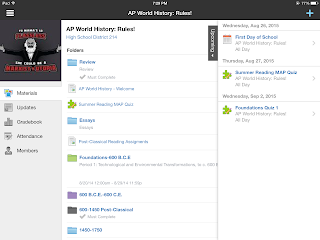
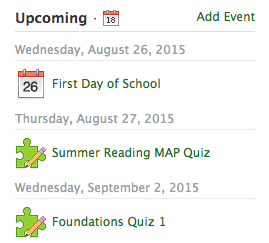

In the calendar, I can post the objective for the day, step by step instructions, images, videos, worksheets, readings, and web links.  I often post images for my bell ringers.  Students can see the images in color and zoom for further analysis. I post the question right there in the event.  This way I do not have to have a PowerPoint slide cued or write it on the board if I am coming into the class in a hurry. Calendar events allow students to post comments.  I often have the students post their answers to the bell in the comments.  
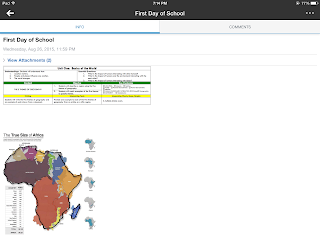
The calendar is great because it is ONE location for the entire lesson's materials. The students do not have to go to a discussion for a simple warm up or exit slip.  They can respond to other's comments, ask questions or do almost any feature a discussion can except grading.  For quick participation, the calendar is great. There are less transitions for students to get lost in the shuffle.  It maximizes classroom time and allows for total participation.   It is really easy for students to post new comments.  Students can see all comments made.

Also, the calendar houses all of the daily materials.  There is little redirection for students to access any of the daily materials. I teacher regular level freshmen, so I try to minimize transitions.  Another benefit is the students can go back to the event for any of the daily activities. If you are using pdfs, the event can have the links that students wouldn't be able to click.

At the end of the class, the calendar provides the opportunity for teachers to have an unplanned exit slip.  If there is extra time, you can have students post three things they learned, a question they have,  a summary of the lesson, or anything else you normally do as an exit slip.  The best part, if you created the event, there is a venue for students to post comments without creating anything new!

Another great feature of the calendar is it automatically archives the event.  Students can go back to any event in the entire semester.  If they miss a day they can go through the calendar and see everything they missed.


If you want to know more about how to do specific features in calendars, Schoology created a how to page. You can access it by clicking here.

Friday, June 5, 2015

First Year of Teaching in Review

By Kristen Gierman 

There is no doubt that one of the most powerful things I did to develop as an individual and educator in my first year at Elk Grove was connecting with others in the building.  Thankfully, the atmosphere that our ITF/DTCs created provided me the opportunity and space to build valuable networks to expand my ideas and teaching practice.

Partaking in collaboration did require an initial nudge, but it generated enormous value at practically no cost to me.  While I understand that time is one of our most precious resources as teachers, I would argue that the transmission of new ideas and perspectives that took place in moments of collaboration far outweighed my fear of “misusing my time” in that way.
In exchanging ideas and listening to the suggestions of others, I not only got to see my ideas improve but also received tangible evidence about how my thoughts could be put to use elsewhere in the school.

This year reaffirmed my belief that good ideas do not develop in isolation or in the confines of our own practice.  Rather, they come from a network of connections that are all around us at Elk Grove if we challenge our ways of thinking and recognize the potential that exists in connecting, learning, and sharing with others.  There is value in the unlikely interactions that occur when clusters of individuals with distinct skills and passions overlap.  It is these combinations that carry the potential to spark innovation and can drive us all forward.

As I wrap up my first year, I want to take the time to thank those who have given me the opportunity to work in conjunction with them and challenged me to grow.  You have served as a clear reminder of the reality that there is a small difference between doing something and doing nothing but the two have wildly different outcomes for our students and us!

On Making Mistakes & Learning in a 1:1 Classroom

By Kim Miklusak

This has been a year of uncharted territory for many of us.  Although I had worked with iPads and technology prior to this year, it was my first year teaching in a full 1:1 classroom.  I have to say I was nervous--especially working with people who had been in iPad pilot programs for a few years.  I was nervous that people would ask me questions that I may not immediately know the answer to.  I was nervous that I would try things out in my classroom and they wouldn't work.  I was nervous that I would take time to make something only to find a better way to do it later.

And you know what?  All of those things happened.  But because of the general support structure at  EGHS--and throughout the district as a whole--as well as the specific support structure of the CollabLab and my peers, I was able to learn and grow alongside those I was helping--and alongside my students!  I appreciate the willingness to share in our school, and I appreciate the instructional conversations we can have in our departments and across departments.  I've learned as much from teachers in other subjects as I have from teachers in my own!  Additionally I've learned so much from connecting with people on Twitter and at EdCamps.

I know the shift in instructional technology is a big one, and we are all in different places with it.  The mindset at our school is so important: move at a pace that is comfortable for you.  For some that means considering the SAMR model and working first with substitution as we digitize curricula.  For some that means trying out one thing such as doing entrance or exit slips on the iPad each day.  For others that could be doing one project on the iPad.  And still for others that means transforming as many pieces of the curriculum as possible.

The key is always, however, to realize that whatever we do for the first time, we may (we will!) find more effective and efficient ways to do it in the future--especially if we share our successes and missteps with others.  As long as our instructional focus comes first and technology comes second, the technology will be there to enhance as oppose to diminish what we do in our classrooms for our students.

Wednesday, June 3, 2015

Saving Courses from the "Archive" in Schoology

By: Rachel Barry

Don't worry, all of your hard work and long hours spent adding documents, building formative assessments, and constructing assessment rubrics to Schoology has not gone to waste for upcoming school years!  Here I will provide you with a simple step-by-step guide to keep your courses live for future use.

1.  Click "Courses" in the top toolbar.


2.  Click "See All" in the bottom right corner of the open tab.


3.  Click on the Setting (gear) aligned to the course you want to keep from being archived.


4.  Click "Edit".


5.  Check "Keep Forever", and your course will be kept at least until January 21, 2025!


6.  Don't forget to SAVE!


If you would like help with this or have any additional questions for the end of the school year, please stop by the Collab Lab!