Thursday, September 24, 2015

Understanding by Design, Feedback and Empathy


What does Understanding by Design, Feedback, and Empathy have to do with each other? Well, they are three core principles that Grant Wiggins believes in and Jay McTighe talked about in his blog post, "Three Lessons for Teachers from Grant Wiggins."
Lesson #1 is to always keep the end in mind. This goes back to discussing Understanding by Design - which is not just backwards design, but really focuses on having specific goals that have appropriate assessments and instruction. This really ties in well with our discussions on Standards Based Grading and Assessment for Learning. Making sure students know the goals are and how to achieve mastery is a huge part of helping them keep the end in mind, as well.
Lesson #2 is that feedback is key to successful learning and performance. If students know what the goals are and how to achieve mastery, the next thing they need to know is where they are at and how to move forward. This is why feedback is vital in the process of learning. McTighe also points out that teachers need to receive feedback (or formative assessement information) in order to know where to guide students. This could even be quick things like exit slips, polls, or a thumbs up/thumbs down activity to gauge learning.

Lesson #3 is to have empathy for your students. I feel that this is one of the most important things to consider, and actually what all of our actions stem from. If we can understand that our students are novices, and realize how we felt when we were a novice at something, it is easier to have empathy for students and create a learning environment that supports them. Some school districts in Illinois are having new staff members shadow a student for a day (after a teacher tried it and Wiggins wrote about it here). When you realize what students go through sitting in classes all day and listening, it makes engagement a lot more important in designing lessons.

Members of EGLLT discussing the article during Monday's meeting.

If you thought about a workshop, conference or meeting you have attended - what would you have done differently to make it more engaging?

I thought about this recently and decided that the meetings and conferences I enjoy are the ones that have specific goals. I know what I'm going to learn, the different parts we are going through, and can follow along the path with the presenter/organizer. I also know exactly how to assess if I've learned what I need to, or that I have accomplished specific goals set out for the meeting (Lesson #1). I realized that I like to know how I'm doing and if I'm not on the right track, how to get back where I need to be. It's so frustrating to have someone look at your work and say, "You kind of got it - you're almost there," and then just walk away (Lesson #2). All of this helps me realize that this is exactly what my students are going through and what they need to be successful (Lesson #3).

We will miss you, Grant Wiggins, and appreciate all the wisdom you have left behind.

Wednesday, September 23, 2015

Technology and Literacy: What is the impact?

Written by Linda Ashida

On our district's non-attendance day, I had some time to catch up on my professional reading, and I came across a piece published yesterday by NPREd, "How TV Can Make Kids Better Readers"


The article summarizes key points of a book publisshed this week:  Tap, Click and Read, by Lisa Guernsey and Michael Levine.  For example: 


1) Digital content can have a positive impact in a two-pronged approach to developing literacy.

2)  The need to address media literacy and critical literacy in conjunction with traditional literacy that has always addressed reading, writing, speaking and listening. 

3) There are assets in both the language and culture of low-income Hispanic-Latino families related to digital media for learning purposes.

This thought-provoking read, would be a great discussion starter in professional learning groups - for teachers of any discipline and any level - who are grappling with the question that opens the article: "Is technology the best thing that ever happened to education? Or a silent killer of children's attention spans and love of learning."


Tuesday, September 22, 2015

Using Flipboard for reading in the classroom

by Kirsten Fletcher

I've had a lot of conversations with staff members recently about how to get students reading in the content area. One of the ideas that came up was to let students explore Flipboard.

Flipboard is a great app to encourage reading because students can search multiple sources for articles on a particular topic. For example, if you want your students to read something about technology, they can search under that tab and browse snapshots of articles (and sometimes videos) from a variety of magazines, newspapers and websites. If a student wants to read more, there is a link that takes them to the full original article. It is also possible to follow others' boards or to tweet links directly from the app.


If students create an account, they can select the topics that most interest them so that those come up first. As a teacher, you could require them to include your subject in those preferences (economy, recipes, fashion, art, etc.) Searching by topic is a time saver and may bring students to resources they might not find by searching through Google. One teacher at our school is using this app to encourage his students to read about current events.


As a language teacher, my favorite feature is that students can choose their International Content Guide in preferences. I have my French students set it to France so that their menu and all related articles and videos pop up in French. This way they have exposure to authentic written and spoken sources.


Have any other engaging ways to get students interested in reading? We'd love to hear from you in the Collab Lab!

Friday, September 18, 2015

Multiplying Learning


Yesterday we had a very special opportunity to do some cool things at Elk Grove High School. Normally on Thursday mornings, educators have time between 7:40-9:00am to meet with PLTs. Yesterday, as Linda described in her previous blog post, we had a "Late, Late Start" which allowed us to have an extra hour of time to learn together!

With this extra time, we decided to get everyone together from some staff-led professional development. The morning started off with a wide variety of Spark Sessions - from mastery learning and peer tutoring, to modeling and scaffolding for learners of all types in a variety of settings. We learned about how these ideas impacted learning and, in some cases, the technology used to make the impact even greater. Each Spark Session was 3-5 minutes - and one session was even live on Periscope!


From there, staff members had the opportunity to learn more about the different Spark Sessions by meeting the presenter and colleagues in different rooms for an informal Learning Lab. It was great to see all the ideas being passed around. The presenters did a great job sparking interest (which then inspired everyone to join a room of their choosing) and then the entire staff was able to talk about different ways to implement the ideas and further ways to improve them.

Colleagues gathering to talk about Visible Learning.
One session I went to was with Adam Clayton, who talked about how important it is to increase language skills in math classes. He wanted to make learning visible by having students talk about their reasoning while solving math problems. To do this, he used Schoology to push out example problems that students opened in Notability. Once in Notability, students then recorded themselves talking about the problems while they solved them (see image below). These recording and notes can then be turned back into Schoology by sharing it as a note (a strategy I thought of last year - to find out more click here).


The most amazing thing about the session was that one teacher posed a question:
If I wanted to respond and write back to the student, could I then send the note to them with my voice and notes added?
Nobody really knew.. I suggested possibly sending it back in an email, but a second later Kim told us that you can drop back assignments to students in Schoology, so why not a note? Next thing you know everyone is playing around in Notability and sure enough - it worked! We practiced adding on additional audio recordings in Notability while drawing - that worked as well! It was amazing to see everyone working together to come up with a great new idea and multiplying learning. I learned something great that I would never have known if we hadn't had all those resources in one room together. So thank you to all my amazing colleagues for the great learning opportunity!

We would love to hear about your experiences with Spark Sessions, the Learning Labs, or any cool professional development opportunities you have been a part of and why they were so enjoyable =)

Thursday, September 17, 2015

Building a Culture of Learning: A Day of Spark Sessions and Learning Labs

by Linda Ashida

Today the Collab Lab hosted Spark Sessions and Learning Labs for all staff during an extended late start Thursday morning.


It was a great morning of professional learning and interdisciplinary collaboration with 8 Spark Sessions (~five minutes each) followed by 2 informal Learning Labs (twenty-five minutes each).

We shared the schedule with staff via this Google Doc.  Our goal for the morning was to spark learning that would continue long after the day was over.  To faciliate future learning, we decided to make the doc editable during the morning and we invited all staff attending to add resources in the far right column of the document.

Feedback from the morning has been very positive. Staff indicated that they enjoyed the variety of the spark sessions and opportunity to learn and explore new ideas with colleagues from so many different departments in the Learning Labs. Also, many noted how the Learning Lab sessions demonstrated the rich interdisciplinary culture of learning at Elk Grove High School that continues to grow. A Spanish teacher commented how she enjoyed collaborating with a Science teacher and two music teachers to experimenting with audio assignments in Schoology! To get a better idea of what our day looked like and sounded like, check out highlights from Twitter curated in this Storify.


Wednesday, September 16, 2015

Cognitive Coaching®


This year I got two new roles as part of my job: Division Technology Coach and Mentor. Both roles allow me to get to know new people, learn from my peers, and use my time to help  staff members here at EG move down the path of new learning.

As part of these new roles, I took a workshop this summer that involved Cognitive Coaching®. The idea behind coaching is that when someone comes to you with stress, problem, or something they are working on - our initial thought is to help them out and give them possible solutions. Studies have actually shown that when you give someone solutions, they only use them about 5% of the time.

If, however, you use Cognitive Coaching® to help guide them towards their own solutions, they are more likely to feel better about the problem and know how to get there.

I am definitely no expert yet, but it has been a lot of fun coaching my colleagues this year instead of always trying to pull something out of my bag of tricks. Oh - there are times people ask me how to do X, Y and Z on Schoology or Notability. For those times, I just sit down with them and play around in the programs. When they come to me with lessons that did not go perfectly or students they are struggling to differentiate for, however, I am trying to spend my time listening and asking questions to really see what they need and where they struggle before helping to guide them to their own answer that will improve everyone's learning.

It's amazing what people will talk to you about and the remarkable ideas they will come up with when you listen =)


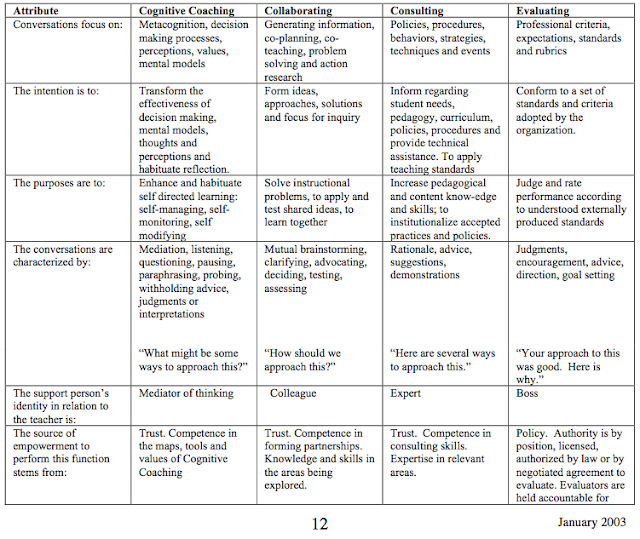
To learn more about Cognitive Coaching®, head over to the website where they have many resources. A great example of the work we did is this chart describing the differences between Cognitive Coaching®, Collaborating, Consulting and Evaluating found in the article "Cognitive Coaching® in Retrospect - Why It Persists."

http://www.thinkingcollaborative.com/wp-content/uploads/2012/08/CC-in-Retrospect-Why-Persists.pdf

Using Quizlet for Vocab Mastery

By Quinn Loch

Both my biology and AP Environmental Science classes have several important terms and concepts throughout each unit. Without a basic understanding of these terms, it's not possible for students to answer deeper level questions that require making connections, application, and problem solving.

One of the tools that I like to use for vocabulary is Quizlet. Quizlet is free, although a $24.99/year teacher account offers some more powerful features that I would argue are worth the money. It is available both on a web browser and on the iPad. Similar to flash cards, Quizlet offers several ways for students to practice their understanding of key terms in more interactive ways.

After making an account, students can join a class that you have set up on Quizlet and can study from "sets" or groups of vocabulary words that you have prepared. Words in a set can be studied as traditional flash cards or students can play a variety of games to help master a set of words.


My favorite part about Quizlet is the ability to see what kinds of terms students are struggling with. You can also (with the paid teacher subscription) see which students have studied a set and how they studied the set.


This feedback allows me to target specific terms and concepts that my students are struggling with in warm-ups and closers. It is also very easy for a student or teacher to "star" and isolate specific terms to study that might need more attention. Quizlet itself can also be great just as a warm up or closer.

Quizlet has a huge amount of shared sets that can be used as well, so creation form the ground up may not be necessary. For instance, sets for the APES textbook we use are readily available from other teachers and can be transferred to your classes. 

While Quizlet is just one of several apps that help with vocabulary, I find it to be one that gives me feedback that can help me modify my instruction to help students reach mastery of key terms and vocab.