Friday, November 11, 2016

How Restorative Practices Can Improve Behaviors

Third post in a series from our staff-led Institute Day.

In his presentation, Justin Penio explained current practices and policies of EGHS and provided teachers with tools to build relationships, manage classrooms, and respond to behavior issues.

Restorative practices changes the mindset of trying to control things to an environment of providing support and encouragement. When we try to maintain control, discipline becomes the focus, which can be limit-setting. Students improve behaviors more often when they are nurtured and given support.


Anticipated Outcomes:
  • Prioritize relationships, community and repairing harm instead of the need to assign blame and dispense punishment  
  • Encourages responsibility and accountability
  • Create positive school culture, respectful relationships, effective teaching and learning


Examples of Questioning:


  • What happened?
  • What where you thinking at the time?
  • What have you thought about since?
  • Who do you think has been affected by what you did?
  • What do you need to do to make things right?
  • How can we make sure this doesn’t happen again? 

Goals of Restorative Practices:

  • Change the behavior
  • Fits with new legislation
  • Incorporates best practices in a school community
  • Aimed to reduce referrals, suspensions, and expulsions


How This Looks At EG:
  • Expanded use of in-school suspension
  • MORE COMMUNICATION
  • Removal of certain privileges such as:
      • Open lunch
      • Parking
      • Intramurals
      • Participation in assemblies
      • Computer Labs
      • Homecoming events
      • Outreach program activities

Teacher Take-Aways:
- Try to avoid power struggles and conflict. These won't help students find motivation to learn.
- It helped to hear/see the Dean perspective on issues that we have with kids. Explaining the methods of support, and the reasons behind them, make the issue come full circle, so the kid can come back to class in a positive manner.

Thursday, November 10, 2016

Travel the World Without Leaving the Classroom!

Second in a series of our staff-led Institute Day blog posts.

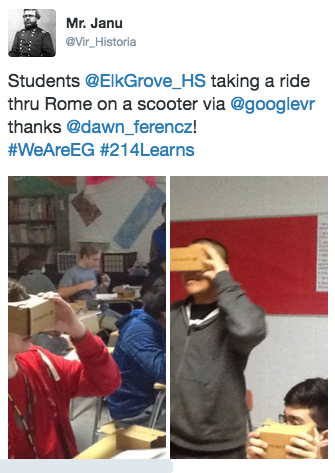
Imagine feeling like you are REALLY climbing a mountain, or REALLY riding a scooter in Rome, but you are just in your classroom using nothing more that a carboard "box" and a cell phone.  Thanks to virtual reality, and Dawn Ferencz's Institute Day session, we learned how to connect to the world outside our classrooms with Google Cardboard viewers. 


Bruce Janu was inspired and decided to try them out with his classes. (Thank you, Bruce, for sharing your example via Twitter!) Check it out: 


How they work:
- Prepare your phone for use by removing the case to allow the google cardboard viewer to close completely.
- Select an app to download or a video to view.  See the suggestions below.
- If you are watching a video, make sure to choose the cardboard option before watching the video.  This will split the screen in two.

Here is a handy classroom handout to use with your students!


Key Teacher Take-Aways:
- English: using these viewers in small groups in class to share information about South Africa for teaching Power of One.
- Foreign Language: Students can check out cities,museums, etc.
- Human Geography: displaced children, exploring cities, food shortages, etc.

Suggested Apps:
- New York Times VR - Sponsored by The New York Times, this provides current event features as well as historical perspectives and opportunities to take virtual tours. Some content is also provided in Spanish. Additionally, there are print articles.
- Google Cardboard - This is the "official" app for Google Cardboard and provides demo for users to practice standard VR options.
- Within - Uses the VR format to tell stories in various genres
- Expeditions - Created for classroom use, students can take virtual field trips to almost anywhere.
- Street View - This also provides for virtual field trips but also includes user content.

Additional links to resources can be found here.

If EG teachers are interested in seeing these in action, please contact the Collab Lab!

Wednesday, November 9, 2016

Learning from our Peers! The tradition continues.

by Linda Ashida

There are so many ways we collaborate and learn from our peers. Our October 2016 Institute Day is one great example. But Professional Learning at Elk Grove High School isn't just a one-day-and-it's-over kind of experience. Professional Learning here is ongoing and responsive to the needs and interests of staff.

One example is our tradition of Peer Observation Groups, first started at in 2011. Since the original groups started, we have developed such a culture of ongoing and collaborative professional learning that on any given day staff has the opportunity to visit classrooms of their peers.

Some Peer Observations happen spontaneously, when a teacher drops by the Collab Lab and invites us to stop by her class to see a strategy in action or ask for feedback. Other times a teacher will contact the Collab Lab to ask if we might help arrange a class visit. This happened recently.  A colleague expressed interest in visiting classes to see varied learning strategies, so we arranged the first in a series of class visits. Our first was to Mark Heintz' Human Geography class. Several teachers joined in. As a follow-up we will meet with Mark later in the week to discuss some of the strategies we observed related to classroom management, workflow with Schoology, student collaboration, and more.


Other Peer Observation experiences are planned in advance by the Collab Lab, like our Teaming on Tuesdays, in response to feedback from staff related to their needs, interests and learning goals for their students. You can read about some of our Teaming on Tuesdays in previous blog posts.  Stay tuned for upcoming Teaming on Tuesday's we will be announcing soon.

In the meantime . . .
  • Do you have successful strategies we might see in your classroom? 
  • Would you like to visit a colleague's classroom to be inspired by student learning in action?
  • Do you have feedback related to your own peer observation experiences?  
We'd love to hear from you!  Leave us a comment or stop by the Collab Lab!


Tuesday, November 8, 2016

Have you seen the 214Ready Blog? Check it out!

By Linda Ashida

Do you want to be inspired by the ways that students are preparing for their future in District 214?  We suggest you check out the 214Ready Blog to learn about the many ways that we collaborate with students, parents and the community to insure that students are college, career, and life ready when they graduate.

This week's post is on the Power of the Hashtag, showing how Social Media can multiply our opportunities to showcase learning in action and build connections and community across the district and beyond. Check it out!


And, if you have suggestions for the 214Ready blog please contact Linda Ashida or Jen Delgado.

Monday, November 7, 2016

Tech Tips & Tricks

Over the next couple weeks, we will be sharing with you what the EGHS staff presented and learned at our staff-led Institute Day.  This is the first in a series of posts.

One of those sessions was presented by Mark Heintz, where he discussed numerous time-saving tips and tricks related to both the MacBook and iPad.

Here is an overview of Mark's tech tips:

1.  Extended Desktop
Allows you to work on your laptop while displaying something else.


2.  Spacebar on the Mac
          This feature allows you to preview a document in Finder, instead of having to load it.

3.  Gestures
 
  1. Two fingers - right click & Three Fingers - drag an item on the desktop
  2. Four fingers up - see all apps that you have open
  3. Four fingers over - switch through multiple "desktops"


4.  Two Different Types of Mirroring

5.  Screen shots
  1. ⌘ + ⇧ + 3 Capture entire screen + save
  2. ⌘ + ctrl + ⇧ + 3 Capture entire screen + copy to the clipboard
  3. ⌘ + ⇧ + 4 Capture dragged area + save (the one I use the most)
  4. ⌘ + ctrl + ⇧ + 4 Capture dragged area + copy to the clipboard
  5. ⌘ + ⇧ + 4 then Space Capture a window +save
  6. ⌘ + ctrl + ⇧ + 4 then Space Capture a window + copy to the clipboard


6.  Spaces
  1. Different classes-different uses


7.  Online quizzes & what I have learned
  1. Review quizzes are the best-hard-time limit


8.  Google docs & Calendars with Links


9.  Screen Recordings with Quicktime
          Each D214 laptop has Quicktime.  It is a quick way to record your screen, voice, or both!

10.  OneTab
          Save and re-open all tabs from day to day.

11. Apple Tab and Apple Tilda
  1. Command + tab - opens all apps that you have open & Command + q - closes all

Thursday, November 3, 2016

Critical Thinking to Prepare for the SAT

By: Rachel Barry

In Illinois, we switched from the ACT to the SAT as our standardized test.  The math department's digital curricula were originally developed based on the ACT College Readiness Standards, however, we made some changes this summer to also prepare our students for the ACT.  You can read more about these changes here.  

One of the document templates of our regular math courses was an ACT10.  We have one of these documents developed for each skill that we teach our students.  The front side of the template presents students with approximately 5 ways that the ACT would question students on the current skill they were learning in class.  The back side of the template gives students a mix of 5 ACT-type questions of topics that students have already learned to reenforce their understanding.  Here is a sample of an ACT10 that was used in my regular level Algebra I class.  

These documents can still be used as warm-up problems and to help students gain an understanding of ACT-style questions, however, the SAT questions are set-up much differently.  The ACT focuses on one mathematical skill per question, while the SAT merges multiple skills into a question.  Therefore, we need to strengthen our students' critical thinking skills in order to perform better on the SAT.

Therefore, I started brainstorming and came up with a new template.  We have been doing a lot of work at Elk Grove High School to find commonalities throughout content areas, so I thought it was fitting to model this template after a science lab report.  Students are already accustomed to the process of writing a lab reports, and this format would help break down the SAT question for students.

Here is a sample of this SAT template:


This document helps in two ways: 1) forces students to slow down when solving the problem and 2) gives students who may be lost a place to start.  Students who benefit the most from the first way are those that know what to do, but make silly mistakes.  The conclusion part of checking their work helps force these students to double check their answers.  The students who benefit from the second way are those who defeat themselves before they start the problem.  These students may read the problem and immediately give up because they don't know what to do.  This step-by-step process helps students to break down the problem to show them that they may know how to do part of the problem.  Then, if they can find confidence in understanding part of the problem, they can try to critically solve the rest of it.  

Monday, October 31, 2016

Professional Learning by Teachers for Teachers: The October 2016 Institute Day

by Linda Ashida

How often do school administrators completely "let go" and completely trust in their staff to take the lead in planning professional learning experiences? At Elk Grove High School it is a common occurrence, and was notable most recently in our October Institute Day.

Guided by school and district Redefining Ready goals, as well as input solicited from the entire staff, a team of 20 certified staff began collaborating in the planning from the first weeks of the school year. You can read more about the planning for the day in this previous post.  

That planning culminated, on October 31st, in a day of varied professional learning experiences, led by teachers and student services staff, that included:


  • An introductory presentation connecting our practice to Redefining Ready and building goals.
  • Department Google Docs to crowd-source notes and resources and multiply learning long after Institute Day is over.
  • 19 workshops facilitated by 33 EG staff members and one guest presenter from Amita Health.
  • Team-building activities including an all-staff Trivia contest.
  • Learning Labs to collaborate in PLCs and interdisciplinary groups to apply learning from the morning workshops.

For more details of the schedule of the day, check out the Collab Lab Website. 


To get an idea of what the day "looked like," check out this Storify.