Showing posts with label grading. Show all posts

Wednesday, March 6, 2019

Changing the culture of traditional grading practices


By Mark Heintz

Last week, I celebrated my attempts to minimize the value placed on grades in order to focus on learning. In my previous post, I triumphed over my progress and stated, “So far, I have never felt better about finalized grades.  Some student anxiety has been alleviated and I don’t feel that I have as many students point-grubbing.  I feel that students are learning. The grade is an afterthought.  They know they can argue to make a change.  They know they have a voice in the process other than just the assessments I use.  It has become a partnership.  Something it should always be.”

I wish it was always this easy.

Minimizing grades is a process, and what I hope to do in writing these blog posts is to be as transparent as possible in hopes others see what I do and are willing to try it as well. I hope to not just present a perfect picture of the process of going to gradeless.  I have encountered many bumps in the road because it’s hard to move away from relying on coercive grading methods, which, if we were to be honest with ourselves, grades are.  It is even harder for students not to feel under the thumb of those practices. I firmly believe in order for me to make larger shifts in going gradeless it will require more people making the effort.  Joy Kirr has curated a lot of educators attempts and practices in going gradeless, and I hope to continue to contribute to that resource hub.


The day I posted that blog, I asked my students some additional questions.  As a class, writing is a focus, and I wanted more descriptive feedback.  In another Google form, I asked them how they felt they're doing and what they needed more help/time on in each of the following areas: making claims, using evidence, explaining that evidence, making connections between arguments, using prior knowledge to set the stage, and again what grade would they give themselves.


I am still incredibly happy with how this is going.  The feedback from the students was overall positive.  Their feedback was constructive and helpful for them and me.  However, I did receive a comment that is troubling me.  One of my students gave themselves an F and was very critical of themselves. I was confused by this reflection because the student has a clear voice, and they actively can do all of the things required of them.  They are a strong reader, and they naturally make connections between topics and disciplines.  If I were using traditional assessment metrics, this student would have an A.

When I conferenced with her, she said she needed the validation from me.  She wanted me to give her the grade.  She has been so accustomed to a teacher being the authority that without my grading her, she simply can’t do it.  I expressed my hope that she should know what she needs/wants, that “grading” yourself would lead to me helping where she need it.  I told her to go back and reevaluate what she put and why.  I got an email later that day asking me to give her a grade.  I again expressed my wishes, but I caved and said I would give her an A.  This was her response:

“You're the teacher. Ultimately, I have no say in what you do. Even with the illusion of us having a voice in anything, we don't. I'm sorry for challenging your beliefs about how you run your classroom, but it's justified by your control over the grade book”


This comment is hitting me in the reflection stomach.  Comments like these demonstrate just how much power a teacher has in determining grades.  Even as I am pushing the boundaries of what is possible in a school, I ultimately hold all of the power. As much as we’d like to think otherwise, using grades leads to a lack of motivation.  The kids are stripped of the agency that I want them to have--partially because I do have the authority, but also because these students are experiencing traditional grading practices throughout the rest of their day and have experienced this practice for most of their schooling.  I have spent this entire year minimizing grades, and I still get comments that reinforce traditional grading views.  Next year, this student will most likely go to classes that reinforce their beliefs.

The ultimate problem of having all of the authority is that students will learn less.  Grading causes a loss of intrinsic motivation.  Giving a grade lends to a mentality that there is an end to learning; The grade is more meaningful than the process and the outcome.  We use grades to get kids to be compliant, but we also see that they don’t take risks and often do required work to memorize what we are asking for the test and then forget it.  However, that is not what I want school to be.  I want them to have agency over their learning, and to do that, they need to have conditions that allow them to take risks, see that learning doesn’t have an end, and not feel threatened nor shamed to learn what we are asking them to learn.

I will continue to make shifts and share my journey in hopes that others do the same.


A special thanks to Kim Miklusak for feedback and edits on this post.  She continues to be the best English teacher I never had.

Tuesday, February 19, 2019

Learning: the struggle in going gradeless

by Mark Heintz

I struggle with grading.  Not keeping up with it, but rather assigning a grade as a measurement of learning.  Maybe the struggle comes from my own experience.  As a student, I was a grade manipulator.  I wasn’t a point-grubber, more of a...okay, I was a point-grubber.   In school, my goal was the grade.  As the teacher handed the syllabus to me on the first day of school, I combed through the categories to find out the most efficient way to get a 90.1%. I love a detailed syllabus. The more information the better.  It gave me the rules on how to earn the grade I wanted. The whole process became a game for me, and I enjoyed how to game the system.

Each teacher had their own rules, and my part to play was to earn points.  I played the game fairly well in high school, but things escalated beyond just manipulating a syllabus. Now, I could game the system even more because I could pick the teacher.  I asked, snooped, around to find out teacher reputations on their system before signing up for the class.  In this system, I knew the teacher held most of the power.  I know the teacher’s intention was for me to learn, but my objective was to get points.


Despite all of the manipulation, I loved to learn.  Grades and learning just didn’t go together for me.  That being said, I never tried to get out of anything. When I was assigned work, I would do it.  I just was efficient and completed it quickly in order to get to my interests.  One of the best parts of college was that the abundance of free time allowed me to explore what I wanted.  Each semester I read books, just not the ones in the syllabus.  I talked to people outside my major about their passions.  My utopia version of school would have been just going to different classes all day, simply talking to others and diving into things I was curious about.  I loved connecting with others and learning for the sake of learning. From that love, I became a teacher.

As a teacher

As a new teacher, and like most people new to a profession, I thought I would be different. I could make the grade book represent learning.  I knew the student tricks and throughout my first decade as a teacher, I changed grading practices in an attempt to have the grade book represent what a student had learned.  I tinkered with my categories, did grade replacement, allowed retakes, and only counted major exams  Ultimately though, I became part of the system I manipulated. No matter how much I shifted, I continued to create conditions just like my teachers had, that made me all-powerful in determining a student’s grade.  My ultimate power continued the trend of having most students playing a game to accumulate as many points as possible.  No matter how much I tinkered, I could only deemphasize the importance of the points, but it still remained the most important goal.  In the end, the goal wasn’t learning.

In my course, there was a mandatory curriculum.  To cover the material, I used a textbook.  Students struggled to understand what was important.  Some spent hours each night digesting the material and others gave up because the task was too daunting.  To help them I used reading guides, but then students copied each other or hunted for the information needed not really understand anything. For this course, I needed the students to get the information and what I was doing wasn’t working.  Either the kids gamed the system or it simply didn’t work for them.  I ditched the textbook.  I created videos and questions that students would complete after viewing.  I put these into Schoology checklists and made them required.  I emphasized that all students would need to complete each checklist. It was compulsory and efficient like my learning had been.  I told each student what they needed to know.  To ensure all kids would complete the work, each had to finish the checklist before they could take the exam. To move away from the point-grubbing, nothing went into the grade book if they completed it.  They simply got to take the test.  From this system, kids spent less time on their work, actually did it, and my scores improved.

Something's wrong

Yet, I knew something wasn’t right.  While the system worked for some, there were inherent flaws.  Some kids did all of the work the way it was intended and still struggled to pass. Others gamed the system by fast forwarding the videos and just taking the quizzes. I found that some of the kids who gamed the system earned the highest scores.  Neither one of those things should happen if the system was about learning.  Reflecting on the system I created, I realized that the system emphasized completion not learning.

Ultimately, having to assign a grade gets in the way of learning.  I understand that and the importance in the role a grade plays for a students future.  Despite that conflict, I continue to deemphasize the grade and have it be about the learning.   In that attempt, last year I made another change in order for the class to focus on learning.  I did this at the end of the year, before the final.  I made a simple Google form. There were three questions: What did you learn? What grade do you think you earned? Why do you think you earned it?  After reading through their responses, I only disagreed with a handful of students; Most of which judged themselves too harshly.  For the few others who I disagreed with, their reflection opened my mind to their experience.  Many students cited their effort as a validation of earning a grade, but others detailed how they collaborated, learned about themselves, changed habits, and just an overall changed in abilities. A lot of that reflection is difficult to easily compute into a grade or empirically assess with traditional metrics.  Asking them their thoughts allowed for their journey to be seen.

Students know their experience more than anyone.  The purpose of the class is for them.  As I continued to want the importance of the grade to drop, I realized I needed the students to be viewed as a partner in determining the grade.  I don’t want them to game the system as I had.  I wanted it to be a journey where they are learning, not just grabbing at points to get the A. The problem with last year: I did it at the end of the year.  It wasn’t a partnership.  It was an afterthought.  Even though I did value their responses, the students didn’t know how much I valued it.  I learned that I need to be transparent in the value I placed in their responses. The process can’t just be lip service; Another thing that they do, but ultimately has no influence.

The present

Which gets to this year.  I asked my students the same three questions every time I have had to formally submit a grade, with two additional ones: What are you proud of? What would you do differently if you could go back in time and redo the time that has passed in this semester?  Again, I learned about their journey.  The two additional questions revealed more about who they were. Anyone that I disagreed with or needed more information, I held a conference with them.  I got clarification on the points they made or what happened in class. After that, I submitted the grade.  So far, I have never felt better about finalized grades.  Some student anxiety has been alleviated and I don’t feel that I have as many students point-grubbing.  I feel that students are learning. The grade is an afterthought.  They know they can argue to make a change.  They know they have a voice in the process other than just the assessments I use.  It has become a partnership.  Something it should always be.


A special thanks to Kim Miklusak for feedback and edits on this post.  She is the best English teacher I never had.

Wednesday, January 17, 2018

Back to Basics: Connecting with Parents/Guardians in the New Semester

By Kim Miklusak 

For many schools the new semester is upon us or rapidly approaching.  For some this means all new classes; for others it means possibly some new students.  Either way it makes me think about the importance of connecting with parents and guardians throughout the year--not just during the opening days.

It's easy to get bogged down with the hustle of the new semester.  At the beginning of the year, we make our agendas and materials available to students through our LMS or by other means.  We may hand out syllabi or send home welcome letters.  But what do we do mid-year?  Do we make regular contact with parents/guardians just to keep everyone up-to-date?

One parent's perspective: 
Although we may not always hear back from parents, or we may be frustrated if we receive "Undeliverable" emails, many parents do receive the message and are grateful for it!  One parent, who has a current senior student and one graduated student from our school, responded:

"I truly appreciate communication from the teachers through Infinite Campus.  Even though my daughter was very organized and very few assignments were completed last minute, I felt it was beneficial for us knowing about the big projects or reports coming due so we had an idea of the stresses she would be under and to encourage her to make the right choice when other social opportunities arose that would take time away from working on her assignments.   I realize she should be responsible for her work, but it helps parent encourage and teach their children how to time manage."

One teacher's perspective: 
In order to reach out to parents and guardians of students who are missing assignments--and to reach out again to remind students of their own work--Psychology teacher Melissa Curtis uses the "Message Center" screen on Infinite Campus to send form emails to students, parents, and guardians two weeks before the end of the quarter to fill everyone in on missing work!

Once she has the template saved, it is easy for her to send out messages to students who have any assignments that are marked as missing in the grade book.  The automated email fills in the blanks below with the students' names, the names of missing assignments, and directs them to the portal for more information!

If any teachers would like more information on sending out templated emails like this one, be sure to contact us, and we can show you how and connect you with other teachers who are doing the same!   Or if you have other ways you reach out to parents and guardians throughout the year, leave us a comment below!


Monday, October 17, 2016

So just now I was thinking... about implementing standards based grading. Woo!

by jessica maciejewski

Midway through our "EG Lead Learners Team" meeting today, my brain was afire with big-picture ideas. Now I'm the kind of person who is critical of ideas (my own included), but once I'm excited and have done basic research about something, I want to run with it. Give it a "trial by fire," persay, and see how it goes, reworking along the way.

So this summer I had the privilege of attending the Pearson Assessment Training Conference in Portland, Oregon, on grading practices. While I am skeptical about Pearson's actual interest in improving education versus making cash monies and maintaining ranking as a top institute merely for the value added to their brand, based on my own experiences with standardized tests and trainings as well as the awesome John Oliver's exposé in regards to standardized testing (holy crap this sentence is already "wordy"),


I left the conference with an educator crush on Myron Dueck and feeling intrigued by a 4- or 6-point grading scale based on below basic, basic, proficient, and mastery levels.

After viewing a bunch of different teachers' grade books (one from 1946, then the rest modern & online), I didn't see any I thought were effectively communicating student progress or fairly assigning grades. Then I looked at my own. I didn't like that one either (though I did like it a lot more than the others at least?). So I set some goals for my 2nd quarter:


Soooooo my current grades are feast or famine. Which is maybe encouraging(?) because if a kid turned stuff in (at ALL), they're at a B. If s/he didn't... it's F City. Ugh, it feels intimate to share this:


Now, by the end of the term, that "grades are real!" hustle will kick in and I'll get more essays and etc. But is that fair? Am I doing this right? If a kid has not turned in aaaaaanything, I can't assess them, so it's listed as missing (which counts as a zero). They can make this up whenever. The sooner the better. Yep, made phone calls home. Yep, conferences with kids. Yep, referred them to the tutoring center. If I didn't do the Missing/0 thing, that kid would think they were passing and then ::SURPRISE, YOU FAILED!:: would happen the last week of the quarter. :/ Should they be passing at all if they have done zero work? E1 FD is Essay 1 First Draft, then E1 R is the revised version. Vocab is mastery oriented (vocabulary.com), self-paced, and falls under reading skills as does IR (independent reading). The grammar tests are self-paced. SAT is multiplied by zero and is not a score, just a baseline "fyi" for kids from our first SAT Writing in class test.

So here are my big idea steps/goals for Q2:

  • break down skills based on the Illinois grades 9-12 ELA Common Core (<that was ridiculously tedious to actually get to)
  • create descriptors of each level of ability in each skill
  • redesign rubrics based on skills
  • update gradebook for quarter 2 with all skills; include related assignments in comments section (Haiku Learning seems like it would be a fantastic standards based grading system, though I just discovered it and have never used it)

Ooookay. Sounds like I have enough for right now. I'm not even sure I can do this for Writing/Grammar, Reading/Vocab, and Speaking by next term. Ideas and *constructive* feedback welcome!

Want to know more about Habits of Work? Check out my post: HoW & Character

Thursday, February 11, 2016

SBG Grade Reporting in Biology

Written by Quinn Loch

The biology team has been transitioning to standards based grading over the past year. You can read more about the practice and the philosophy behind SBG here. Our goal was to align our assessments (both formative and summative) to our learning targets so it was clear to both us and to students what their current level of understanding was for a specific learning target.
Standards based grading can provide meaningful feedback for a specific skill or standard.

Our transition is still a work in progress and needs fine tuning, but I feel that it has increased transparency in the grade book. I can say to a student that they have a "C" in class not because of arbitrary points earned on quizzes or homework, but because they have not met basic understanding of specific learning targets.

The struggle with this system so far has been how to effectively communicate progress to students. My students check their grades on Infinite Campus regularly, but I wanted to provide a more accurate representation of their learning progression. Here is what that looks like:

What my custom SBG progress report looks like.

To create these grade reports, I use a google sheet add on called "Autocrat." It takes information from a spreadsheet and inputs it into a template. From there, a PDF or Google doc is created and can be emailed to the specific student. With a little set-up, all of this becomes automated with a single click! It is a little extra work on my end, but I have found that the clarity helps my students understand what specifically they need to improve.

Friday, January 15, 2016

Final Exam Grades & Submission in Infinite Campus

This blog post is to be used as a reference for creating your final exam/assignment in Infinite Campus, how to finalize your grades, and how to generate reports to save for your records. We would like to thank the D214 ITF team (Linda Ashida, Dawn Bodden, Matt Hamilton, Rebecca Kinnee, Gabriella Stetz-Jackson, and Jeff Vlk) for compiling these resources!

1. Creating Your Final Exam Assignment and Entering Scores
  • Log in to Campus Instruction and click on Grade book on the left side:
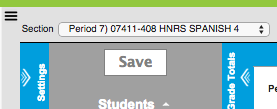
  • Select a class from the drop down menu:
JHHS HD:Users:gabriella.stetz:Desktop:Screen Shot 2014-11-24 at 2.23.36 PM.png
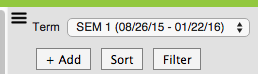
  • Click +Add to add your final exam assignment:
Screen Shot 2016-01-04 at 10.33.05 AM.png
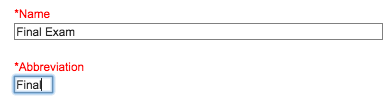
  • Enter the name and abbreviation as usual:
Screen Shot 2015-05-07 at 2.05.11 PM.png
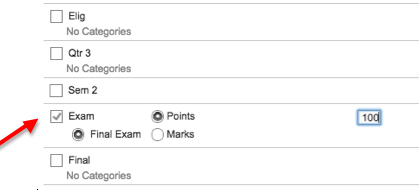
  • For the grading task, select Exam and enter the total points possible:
Screen Shot 2015-05-07 at 2.08.56 PM.png
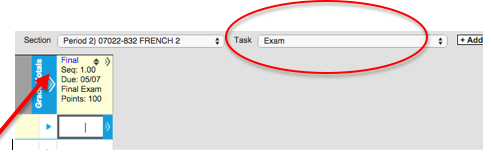
  • IMPORTANT: Once you create your assignment, you will not see it in the same window as all of your Sem 1 assignments. You must select Exam from the dropdown to see the assignment and enter scores:
Screen Shot 2015-05-07 at 2.12.13 PM.png
  • If you have multiple parts to your final exam, follow these directions for each part you need to enter (click +Add, add the assignment and select Exam for the grading task to enter the points possible).
  • After you have created  your assignment, fill in the grades for the assignment.  

Then:

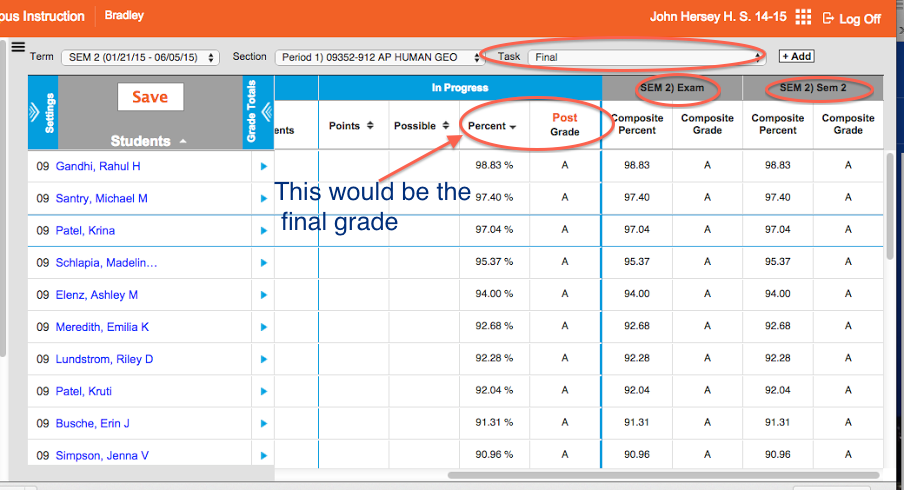
Go to the Final task and check to see that the grades are the way that you want them.  In this screen, you will be able to see the posted Final Grade, the Sem 1 Exam grade, and the Sem 1 Sem 1 grade.  If you need to override or adjust any grades, you will need to do this in each individual task.  


You will receive directions soon on SUBMITTING end of year grades and running end of year reports!

2. Submitting Semester Grades
Remember that these steps need to be completed for each and every class.
  • Log in to Campus Instruction and click on gradebook on the left side:
  • Select a class from the drop down menu:
JHHS HD:Users:gabriella.stetz:Desktop:Screen Shot 2014-11-24 at 2.23.36 PM.png
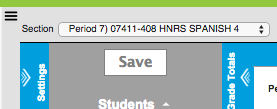
  • Click on Settings to expand the window:
Screen Shot 2015-03-19 at 8.58.12 AM.png
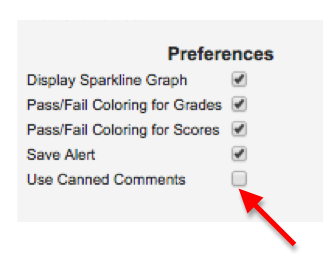
  • Under the Preferences menu, select Use Canned Comments and click SAVE (THIS STEP WILL NEED TO BE DONE FOR EACH SECTION YOU TEACH):
Screen Shot 2015-03-19 at 8.57.20 AM.png
You may have already done this at the beginning of the semester. Please see sheet included in email with all of the canned comments you can use!

COMPLETING SEMESTER GRADES INVOLVES THREE STEPS:

  1. Post to Sem 1 Sem 1 (this is the grade BEFORE the final exam is factored in)
  2. Post to Sem 1 EXAM (this is the final exam grade)
  3. Post to Sem 1 FINAL (this is the final transcripted grade - made up of the Sem 1 grade and the EXAM grade)

STEP 1--Post your Sem 1 grades!
  • Be sure you have your Sem 1 Sem 1 gradebook selected where all of your grades have been populating:
Screen Shot 2016-01-04 at 10.43.32 AM.png

  • Click the POST button above the word Grade in the In Progress section:
Screen Shot 2015-03-19 at 9.03.17 AM.png
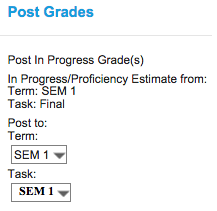
  • In the Post Grades window, select Sem 1 for Term and Sem 1 for Task.
Screen Shot 2016-01-04 at 11.09.00 AM.png
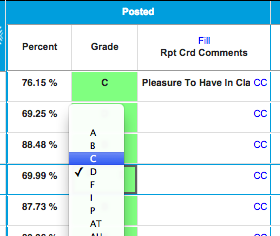
  • Once you are taken to the Sem 1 window you will see your posted grades. Here you can review the grades and make any necessary changes/overrides:
Screen Shot 2015-03-19 at 9.27.16 AM.png

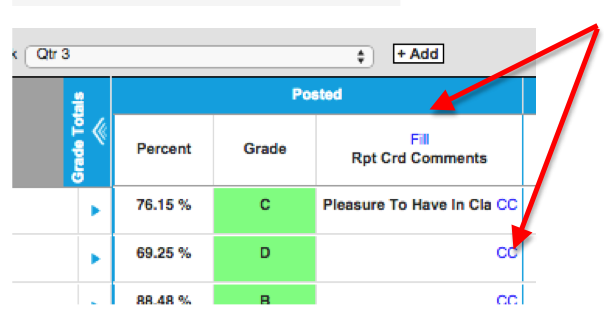
  • In this same window, you will also see options to either FILL in your own comments, or use CC for Canned Comments:
Screen Shot 2015-03-19 at 9.10.35 AM.png

Note: For consistency sake, we are going to put all of our comments HERE, not in the final grade section. This way, the comments will populate all in the same place for the students.

  • Click on CC to select canned comments - check the boxes next to the comments you wish to select and then click Add Comments (YOU CAN SELECT UP TO TWO COMMENTS)

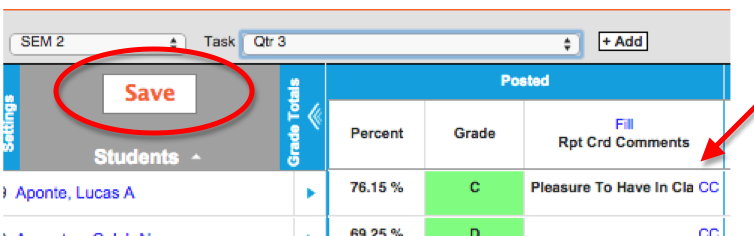
  • You will see the comments you select filled in next to the students names and grades. Click Save when you are finished!
Screen Shot 2015-03-19 at 9.17.19 AM.png

STEP 1--Post your Exam grades!
  • You now need to submit your final exam grade. Be sure you have your Sem 1 Exam gradebook selected. When you open this grade book, if you put in your final exam assignment correctly, you will see your final exam grades here.
Screen Shot 2016-01-04 at 10.45.54 AM.png

  • Click the POST button above the word Grade in the In Progress section:
Screen Shot 2015-03-19 at 9.03.17 AM.png

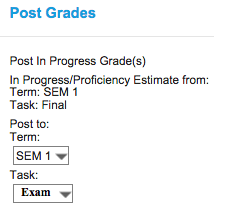
  • In the Post Grades window, select Sem 1 for Term and Exam for Task.
Screen Shot 2016-01-04 at 11.07.25 AM.png
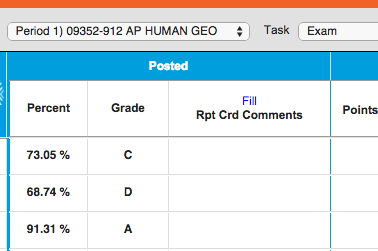
  • Once you are taken to the Exam window you will see your posted grades. Here you can review the grades and make any necessary changes/overrides:
Screen Shot 2015-05-19 at 9.42.24 AM.png

  • Click Save when you are finished!
Screen Shot 2015-03-19 at 9.17.19 AM.png

STEP 3--Post your Final grades!
  • You now need to submit your final grade that is transcripted. Be sure you have your Sem 1 Final gradebook selected. When you open this grade book, the grades that populate there will be the calculation of your Sem 1 grade and your Final Exam grade based on your grade calc options set-up.
Screen Shot 2016-01-04 at 10.47.13 AM.png

  • Click the POST button above the word Grade in the In Progress section:
Screen Shot 2015-03-19 at 9.03.17 AM.png

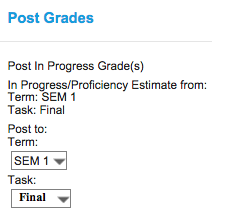
  • In the Post Grades window, select Sem 1 for Term and Final for Task.
Screen Shot 2016-01-04 at 11.08.20 AM.png
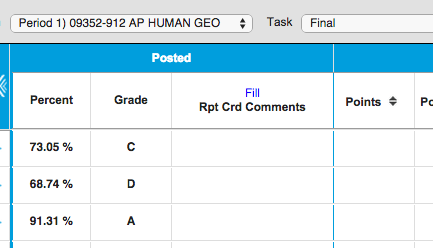
  • Once you are taken to the Final window you will see your posted grades. Here you can review the grades and make any necessary changes/overrides:
Screen Shot 2015-05-19 at 9.42.54 AM.png
  • Click Save when you are finished!
Screen Shot 2015-03-19 at 9.17.19 AM.png
To submit your NEXT class, switch classes and be sure to GO BACK TO THE START OF THESE DIRECTIONS AND FOLLOW ALL STEPS.

TO CHECK YOUR WORK:
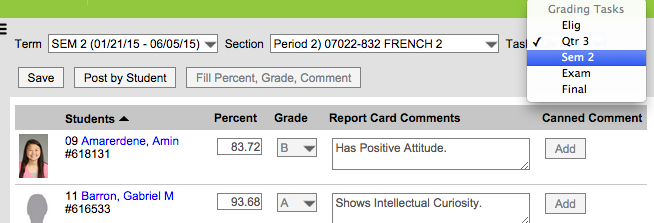
You can go back to each class and confirm that you have successfully posted grades. Just like when you post your eligibility, you can see that grades have posted because the posted section will be populated.
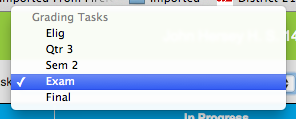
Click on the dropdown menu and select the Grading Task you want to check:
Screen Shot 2015-05-13 at 11.02.39 AM.png
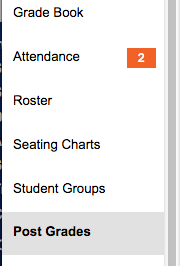
ALSO, you can select Post Grades from the navigation on the left side and see what you have posted for each grading task:
Screen Shot 2015-05-13 at 11.05.08 AM.pngScreen Shot 2015-05-13 at 11.03.12 AM.png

3. Generating End of Year Reports
Please generate BOTH of these reports AFTER YOU HAVE FINALIZED GRADES for all of your classes and save them to PDF for your records!

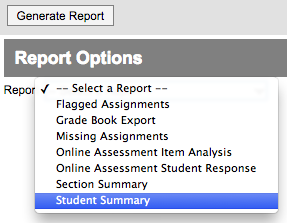
STUDENT SUMMARY REPORT:  In order to see the breakdown for semester, final exam and final grades, you can generate a Student Summary Report:
  • Log in to Campus Instruction and click on Reports (Gradebook) on the left side:
Screen Shot 2015-05-08 at 1.36.46 PM.png
  • Select Student Summary from the drop down menu:
Screen Shot 2015-05-08 at 1.37.22 PM.png
  • Go through the checkboxes and make your selections. Then click Generate when you are ready:
Screen Shot 2015-05-08 at 1.45.11 PM.png
  • You will see a report that displays the grade summary for each student:
Screen Shot 2015-06-02 at 6.59.42 AM.png

SECTION SUMMARY REPORT: In order to see a report of all assignments, abbreviations and scores, you can generate a Section Summary Report:
  • Log in to Campus Instruction and click on Reports (Gradebook) on the left side:
Screen Shot 2015-05-08 at 1.36.46 PM.png
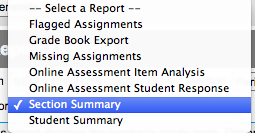
  • Select Section Summary from the drop down menu:
Screen Shot 2015-05-08 at 2.49.19 PM.png
  • Go through the checkboxes and make your selections. Then click Generate when you are ready:
Screen Shot 2015-05-08 at 1.45.11 PM.png
  • This report will be several pages long and will show you the following:
    • A log of your assignments and their abbreviations
Screen Shot 2015-06-02 at 7.03.36 AM.png
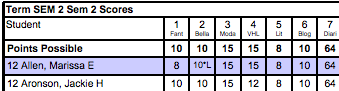
    • Scores on all assignments for all students
Screen Shot 2015-06-02 at 7.03.59 AM.png
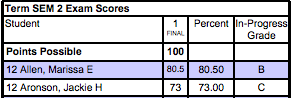
    • Your Exam assignment(s) and scores for each student
Screen Shot 2015-06-02 at 7.04.27 AM.png
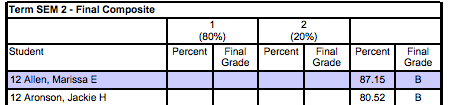
    • Your final composite score for the semester for each student
Screen Shot 2015-06-02 at 7.05.35 AM.png