By: Rachel Barry
In an earlier blog post, I shared my want to learn more about my students through writing. I challenged myself to create more opportunities to allow my students to express themselves through writing. After talking to various teachers (of various subjects, I might add), I decided to start journaling with my students. I will be honest, a majority of my ideas for implementation were stole from US History teacher Saarah Mohammed.
The Process
Starting in Quarter 4, a prompt was posted on Schoology each Friday for students to reflect and respond to. Students were given approximately 10 minutes to write, though when needed, students could take more time. I started with prompts that I was curious about "Without monetary constraints, where in the world would you travel to? Why do you want to travel there, and who would you take with you?" Then, by Saarah's recommendation, I started using next years' Common App writing prompts as inspiration. For example, I adapted "Discuss an accomplishment, event, or realization that sparked a period of personal growth and a new understanding of yourself or others." to "What is your proudest accomplishment?"
The Effect
I was amazed at how open my students were in sharing some personal stories and feelings, and I loved the students reactions when they saw that the day's agenda included a journal. I saw my students in a new light, as some who normally struggle in math were thriving in the world of writing, while others were more frustrated that they couldn't just get right to simplifying complex numbers.
I learned so much. I learned about a student who have overcome depression and suicidal thoughts, another who want to study abroad because they have never left Des Plaines or Elk Grove Village, a student who can't wait the fall to be able to go to their farm and help out with the harvest, one who shared being asexual and wants to educate others, a student who is working hard on his Eagle Scout project, another who is struggling to care for her younger sister when the parents are rarely in the picture, and so many students excited about their school activities. I am eternally grateful for my students' willingness to share their stories with me, as I am forever changed by these relationships that I have built.
Next Steps
Now that I have opened this can of worms, I can't close it. I know that I will start the year with my students journaling and continue the process throughout. Starting earlier and building this process, I hope to also incorporate some academic self-reflection questions, such as "What grade have you earned?" (stolen from Mark Heintz), "How can you use the feedback from _ assignment/assessment to improve your learning?", or "Now that you have achieved your goal, what is your new goal?" My goal is to build more metacognition skills as well as break down the barrier that we can only learn math in a mathematics class.
One of the things that surprised me the most was that the students who forgot their iPads and wrote their journals on paper tended to write more. However, I wasn't able to keep a conversation going, as I did with other students in the comments section on Schoology. I have debated the idea of each student having their own journal, though logistically this could be difficult, as I typically read these journals at home over the weekend. If anyone has any insight into trying some of these methods, I would greatly appreciate any imput!
Showing posts with label Schoology. Show all posts
Thursday, May 31, 2018
Wednesday, August 23, 2017
Critical Thinking on the First Day of School
By: Rachel Barry
Following up on yesterday's post on the ways teachers build relationships with and among students on the first day of school, I wanted to share a more in-depth look at my first day of classes.
This past spring and summer, numerous math teachers around the district embarked on an opportunity to take a massive open online course (MOOC) from Stanford University called How to Learn Math for Teachers. This course focused on how to change student mindsets towards mathematics, pedagogical strategies to promote active learning, and build critical thinking skills. (Small plug...there were about 80 teachers across the district - math, science, special education - who took this course, and it was AWESOME!). Prior to taking the class, I felt that I had a strong understanding of how to change the focus in class from grades to learning, however, this class gave me numerous more strategies to emphasize this more through how I communicate and how I create effective classroom activities. Here are some activities that I did on the first day of classes to both build relationships as well as challenge students to think critically.
Would You Rather...?
In groups, I had students develop a "Would You Rather...? statement, one per group, and wrote it on their tables (see whiteboard tables here). Then, the students rotated around the groups and voted at each table.
In my AP Statistics class, I took this a step further and had students discuss the expected outcome prior to voting. This is a key concept of statistics, so I loved being able to bring it up on the first day. In this class, we continued the first day by performing a simulation where they worked in groups, getting to know one another, and getting introduced to statistics.
In my regular Algebra classes, I had the students calculate the percentages of tallies for each. It was interesting to see the various methods that students used (proportions, decimals, etc) and whether or not the set up two equations or if they calculated one and then subtracted that from 100 to get the other. We then had a class discussion on how many math problems can be solved using different steps or methods.
This lead perfectly into my next activity...
Number Sense Activity
For this activity, I put this problem on the board and showed students how to solve this using traditional methods. Then I challenged them in their groups to come up with FOUR other ways to solve this problem.
Following up on yesterday's post on the ways teachers build relationships with and among students on the first day of school, I wanted to share a more in-depth look at my first day of classes.
This past spring and summer, numerous math teachers around the district embarked on an opportunity to take a massive open online course (MOOC) from Stanford University called How to Learn Math for Teachers. This course focused on how to change student mindsets towards mathematics, pedagogical strategies to promote active learning, and build critical thinking skills. (Small plug...there were about 80 teachers across the district - math, science, special education - who took this course, and it was AWESOME!). Prior to taking the class, I felt that I had a strong understanding of how to change the focus in class from grades to learning, however, this class gave me numerous more strategies to emphasize this more through how I communicate and how I create effective classroom activities. Here are some activities that I did on the first day of classes to both build relationships as well as challenge students to think critically.
Would You Rather...?
In groups, I had students develop a "Would You Rather...? statement, one per group, and wrote it on their tables (see whiteboard tables here). Then, the students rotated around the groups and voted at each table.
In my AP Statistics class, I took this a step further and had students discuss the expected outcome prior to voting. This is a key concept of statistics, so I loved being able to bring it up on the first day. In this class, we continued the first day by performing a simulation where they worked in groups, getting to know one another, and getting introduced to statistics.
In my regular Algebra classes, I had the students calculate the percentages of tallies for each. It was interesting to see the various methods that students used (proportions, decimals, etc) and whether or not the set up two equations or if they calculated one and then subtracted that from 100 to get the other. We then had a class discussion on how many math problems can be solved using different steps or methods.
This lead perfectly into my next activity...
Number Sense Activity
For this activity, I put this problem on the board and showed students how to solve this using traditional methods. Then I challenged them in their groups to come up with FOUR other ways to solve this problem.
Some students hit the ground running, while others sat back. It was interesting when most groups got two right away (15 + 15 + 15 + 15 and 4 + ... + 4), and then they hit a road block. Some students immediately started drawing (a grid of 15 x 4, four circles with 15 dots in each), and others sat back and observed. Many students also separated or broke down the numbers (10 x 4 = 40, 5 x 4 = 20, 40 + 20 = 60 or 15 x 2 = 30, 15 x 2 = 30, 30 + 30 = 60). The last method, though only two of my three classes saw it, was time.
As groups were finishing up, I was having students share at the front of the board. I have always struggled getting students (probably me coming up with excuses as to why it may not work) to do this regularly in class, so I decided to just start it on the first day, as a class norm.
I repeated this method with 25 x 7, and the students were much quicker, using other groups' methods. Many students then saw the connection to money.
Rectangle Activity
For the next activity, I drew this figure on the board and asked students "How many rectangles are in this figure?"
Now that students were acquainted with one another, the brainstorming started much quicker. In each class, after about a minute or two had passed, a student asked "Is a square a rectangle?" YES! Exactly what I'd hoped! We then had a (short) discussion about the importance of asking questions and challenging me throughout the course by asking "Why?" Then students continued working. It was very cool to see students using colors, breaking down the figure, etc. (If you want to know, there are 18!)
Fractions Activity
The last activity was for me to formatively assess students' prior knowledge of fractions. Our first unit focuses on simplifying exponents and radicals, and if students do not fully understand the basics of fractions, they will struggle when we throw in variables, exponents, and square roots.
I wrote random fractions on a bunch of notecards. Each student was given a notecard and a partner. Each pair was given a die. Students were to roll the die, and if the die landed on an odd number, they added the fractions, while if it landed on an even number, they subtracted the two fractions. Once they solved for the correct answer, one person traded their notecard with one of another group. They repeated the process. Next, they used the same notecards and rolled the die with an odd number meaning that they would multiply the fractions, and an even number would mean dividing the fractions. They switched cards, and repeated.
Survey
Finally, students opened their iPads, logged into Schoology and pulled up a Google Form survey. In this survey, I ask them both routine questions (when is your lunch/study hall, who is your counselor, when is your birthday, etc.) and getting to you know questions (what are your future career goals, is there anything that I should know that would help me better teach you?)
Monday, November 21, 2016
A Semester of Thanks
By Mark Heintz
As I have been continually inspired by Kim Miklusak, the most recent inspiration was from her latest blog post on her reflections from NCTE. Since most of what I am reading is concerned with fear, doubt, hate on global events, I wanted to have a positive moment and reflect on the things I am thankful for this year.
The first thing I am thankful for are my students this year. I know how it sounds. But really, they are great. I will try to give just one instance. I have been assigning Schoology checklists for some time, and this quarter I added a new element that was very challenging to my Human Geography students. I took some time to explain to my students how they should view the checklist as an opportunity to receive feedback on their learning and gaps in their understanding. They are very aware of how much I love to talk about education. Anyways, I wanted to instill the idea that if they are struggling, they need to advocate for themselves. I gave them my email address and had them copy it down. After that day, I had so many emails from students emailing me when they completed the checklist, asking for quick help, or saying how they were embarrassed to ask for help in person. I was taken aback by those emails. Those kids should receive a special award for reaching out to me despite their anxiety. One student emailed me because she was going to miss the day before a summative assessment, and she wanted to ensure she was ready. This paragraph has gone on much longer than I intended, but my students are great!
Another thanks goes to all the teachers that have allowed me to visit their classroom this year. I have been in to see graphics arts, math, English, PE, history, and chemistry courses this year. I am still amazed at how open our school is. Every time I asked a teacher, they have been so willing to share their classroom. An English teacher who is retiring this year opened his door to everyone to showcase how he teaches the writing process. He contributes to a movie blog and he went through the writing process for that blog with each of his classes. I have been a long time reader of the blog and was fortunate enough to visit his class one of the periods. I was blown away! It was amazing to witness how he writes, but also how he included his students in the process. A teacher who could have shut his door in his final year has been so open to sharing ideas and welcoming people into his classroom. I know I continue to grow because of the exposure to new ideas and dialoguing with peers about student learning.


Before this gets too long, I am so thankful for the teacher led institute day. I sat in on a session led by the 2016 Illinois Teacher of the Year, Ricky Castro. The things he has accomplished and done for his students are amazing. How he reaches out to students and parents who do not have an easy access to the school is stunning. He quickly went through differences on cultural values and traits of different socio economic levels. I had many take aways from his session and so many questions that have been percolating. I saw why he was the teacher of the year in just a few minutes.
As I have been continually inspired by Kim Miklusak, the most recent inspiration was from her latest blog post on her reflections from NCTE. Since most of what I am reading is concerned with fear, doubt, hate on global events, I wanted to have a positive moment and reflect on the things I am thankful for this year.
The first thing I am thankful for are my students this year. I know how it sounds. But really, they are great. I will try to give just one instance. I have been assigning Schoology checklists for some time, and this quarter I added a new element that was very challenging to my Human Geography students. I took some time to explain to my students how they should view the checklist as an opportunity to receive feedback on their learning and gaps in their understanding. They are very aware of how much I love to talk about education. Anyways, I wanted to instill the idea that if they are struggling, they need to advocate for themselves. I gave them my email address and had them copy it down. After that day, I had so many emails from students emailing me when they completed the checklist, asking for quick help, or saying how they were embarrassed to ask for help in person. I was taken aback by those emails. Those kids should receive a special award for reaching out to me despite their anxiety. One student emailed me because she was going to miss the day before a summative assessment, and she wanted to ensure she was ready. This paragraph has gone on much longer than I intended, but my students are great!
Another thanks goes to all the teachers that have allowed me to visit their classroom this year. I have been in to see graphics arts, math, English, PE, history, and chemistry courses this year. I am still amazed at how open our school is. Every time I asked a teacher, they have been so willing to share their classroom. An English teacher who is retiring this year opened his door to everyone to showcase how he teaches the writing process. He contributes to a movie blog and he went through the writing process for that blog with each of his classes. I have been a long time reader of the blog and was fortunate enough to visit his class one of the periods. I was blown away! It was amazing to witness how he writes, but also how he included his students in the process. A teacher who could have shut his door in his final year has been so open to sharing ideas and welcoming people into his classroom. I know I continue to grow because of the exposure to new ideas and dialoguing with peers about student learning.
Before this gets too long, I am so thankful for the teacher led institute day. I sat in on a session led by the 2016 Illinois Teacher of the Year, Ricky Castro. The things he has accomplished and done for his students are amazing. How he reaches out to students and parents who do not have an easy access to the school is stunning. He quickly went through differences on cultural values and traits of different socio economic levels. I had many take aways from his session and so many questions that have been percolating. I saw why he was the teacher of the year in just a few minutes.
Finally, the other session I attended was by Emily Mikuzis and Jacqueline Figliulo on Metacognition. I have struggled, like many other teachers how best to get students to think. They had such positive stories to tell and I will follow up with a blog post just on that session. But, for now, it has changed my questioning technique in my classroom.
These are just a few of the things I am thankful for this semester!
Tuesday, May 17, 2016
Using Schoology to have Students Self-Assess
By Mark Heintz
A few days ago Kim Miklusak came in to the Collablab and had an idea! She wanted to have students become better at self-assessing their ability level in writing. You can read about it here. She wanted students to have a greater awareness of what they are good at and what they need help with. Even more, she wanted a way to see the student self-assessment next to the teacher's assessment to see which students scores are not on par with their actual ability level. A teacher can easily create a rubric in Schoology and assess the students ability level. But it is time consuming to compile all of the student self-assessment data and record it next to the teacher's assessment score.
As of right now, a student cannot self-assess using a Schoology rubric. However, there is a workaround that I believe will allow students to self-assess and have teacher's easily see if students are close to assessing their ability levels in relation to the teacher's feedback.
The first step in this process is to create standards! I created two in a new category entitled "writing." I wanted to test this out, so I created a thesis standard and evidence standard.
You will need to allow partial credit. And in the box next to grading, put four points. This will allow for Schoology to record that the student marked only some of the choices and not code the question as 100% incorrect.
I then added the learning objectives to the question. For the thesis question, you only want to add the thesis learning objective. When finished, click create.

Add the rubric to an assignment. When creating the assignment it is imperative that you place the writing in a category and attach the rubric. If it is not graded it will not go into the mastery report. Have students submit their writing.
Then, grade their writing using the rubric. Once you submit a score for the writing, then you will be able to go into the mastery reports and see your score compared to the students.
If you click on thesis, it will expand the category to show all of the assignments coded with the learning objective. In this case, there should be two. The assignment titled "Writing" was the student submission and the assignment titled "Writing Trial" was the teacher's score. I can clearly see that a student self-assessed at a level three out of four since his or her score was 75%. My score was 100%. So there is a disconnect in the student's self-assessment and the teachers.
A few days ago Kim Miklusak came in to the Collablab and had an idea! She wanted to have students become better at self-assessing their ability level in writing. You can read about it here. She wanted students to have a greater awareness of what they are good at and what they need help with. Even more, she wanted a way to see the student self-assessment next to the teacher's assessment to see which students scores are not on par with their actual ability level. A teacher can easily create a rubric in Schoology and assess the students ability level. But it is time consuming to compile all of the student self-assessment data and record it next to the teacher's assessment score.
As of right now, a student cannot self-assess using a Schoology rubric. However, there is a workaround that I believe will allow students to self-assess and have teacher's easily see if students are close to assessing their ability levels in relation to the teacher's feedback.
The first step in this process is to create standards! I created two in a new category entitled "writing." I wanted to test this out, so I created a thesis standard and evidence standard.
To have students self-assess on these custom learning objectives, I created a multiple choice quiz. To have the mastery of these objectives show in Schoology, you must place the quiz in a graded category.
I made two questions in the quiz. One question was for the thesis and one question was for the evidence. I made four available answer choices to mimic the traditional four point rubric. To reinforce the criteria for each point on the rubric, you could embed the rubric in the question. Or, you could embed the criteria for each point on the rubric in the answer choices. Either way, this step will help or reinforce student understanding of the difference between the four points on the rubric, and lead to improved reliability in student self-assessment.
For the question, I made all of the choices the correct answer. Then the student will mark ALL of the levels they feel they are competent at. So, if a student feels they are at a level three competency, the student would mark choices one through three.
I then added the learning objectives to the question. For the thesis question, you only want to add the thesis learning objective. When finished, click create.
The quiz is for the students to self-assess and you to see what the student feels his or her competency level is. If you want to compare your assessment to the students, then you will need to create a rubric.
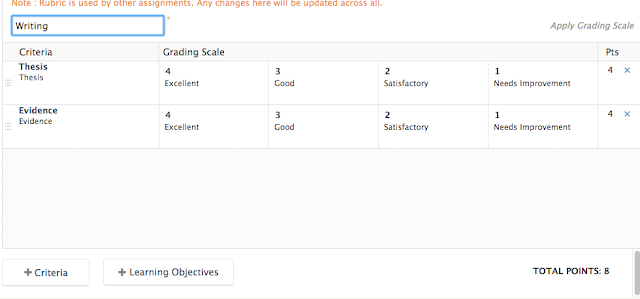
For this rubric, I added two criteria, thesis and evidence. I added my two custom learning objectives to the rubric. You can do this by clicking on the learning objectives at the bottom. When you add a learning objective, it will automatically place four criteria for the grading scale. You could be as specific as you wanted in each of the criteria.

When you click on the learning objectives Schoology will direct you to all available learning objectives. You can add all of your custom learning objectives at one time that you have already created.
Add the rubric to an assignment. When creating the assignment it is imperative that you place the writing in a category and attach the rubric. If it is not graded it will not go into the mastery report. Have students submit their writing.
Then, grade their writing using the rubric. Once you submit a score for the writing, then you will be able to go into the mastery reports and see your score compared to the students.
When you click on mastery in Schoology, you will see your learning objectives. One should be thesis, or whatever you named yours. If you did it correctly, and students have taken the quiz and you have graded their assignments, there should a percentage for your students. Next to the students score, there should be a little superscript with the number two.
If you click on thesis, it will expand the category to show all of the assignments coded with the learning objective. In this case, there should be two. The assignment titled "Writing" was the student submission and the assignment titled "Writing Trial" was the teacher's score. I can clearly see that a student self-assessed at a level three out of four since his or her score was 75%. My score was 100%. So there is a disconnect in the student's self-assessment and the teachers.
If you just hover over the two on the previous screen it will pop up the two scores.
Although this is a somewhat complicated way to compare scores, it can be a great way to record their self-assessment. It is an easy way to compile a lot of data and store it in one spot centered around learning objectives. Most importantly, it is a powerful way to engage students in self-reflection on their own learning. AND a way to dialogue with students in a meaningful and targeted to improving on very specific learning objectives. Conversations can be centered around disconnect and misunderstanding of what mastery even is.
Monday, May 9, 2016
Student Voice in Professional Learning
Written by Linda Ashida
This year, more than in previous years, the Collab Lab has invited students to join us in our professional learning experiences. For example: for Parent Teacher Nights we have invited students to showcase examples of learning with technology; on in-service days we have asked students to present spark sessions to staff; and, for our Teaming on Tuesdays (ten-minute class visits with optional follow-up workshops) we have invited students to join us and share examples of how their teachers use Schoology.
The more we include students, the more we realize the impact of including their voice, and the more we realize we should include students more often!
Each and every student connection gives us an opportunity to learn from their unique perspectives; we gain new insight to reflect on and revise our practice. For some specific examples of how student voice impacted our professional learning, check out this previous blog post, Teaming on Tuesdays: Next Steps with Schoology.
Another way we include student voice during professional learning is during visits to classes.
A recent example is from last Friday when the Collab Lab hosted a site visit for the Midwest Apple Distinguished Schools Showcase. Educators from area schools and staff from Apple had the opportunity to visit 5 different classrooms. In all of those classes we had the opportunity to walk around and talk to students, and in a few classes teachers paused their instruction for 5-10 minutes for student demonstrations and Q and A with students. Students shared examples of how they collaborate and do peer editing with Schoology Media Albums, how they can work at their own pace to master learning with Schoology quizzes, how they use presentation tools and video creation tools to demonstrate their learning and publish their work, and how they share their work beyond EG via social media.


We'd like to give a shout out to Christina Barnum, Joe Bush, Carmen Ruiz, Mark Heintz, and Amy Burke -- and their students! -- for so willingly opening their classrooms to our visitors.
This week we will be visiting Lisa Martineau's Yearbook class to learn from her students about how they develop skills in creative thinking, problem solving, collaboration and teamwork, and leadership. Look for a blog post on that soon!
Do you have student work you would like to share and showcase? Do you have ideas for including student voice in professional learning experiences? We'd LOVE to hear from you!
Leave us a comment, email us (CollabLab@d214.org), or stop by the Collab Lab!
This year, more than in previous years, the Collab Lab has invited students to join us in our professional learning experiences. For example: for Parent Teacher Nights we have invited students to showcase examples of learning with technology; on in-service days we have asked students to present spark sessions to staff; and, for our Teaming on Tuesdays (ten-minute class visits with optional follow-up workshops) we have invited students to join us and share examples of how their teachers use Schoology.
The more we include students, the more we realize the impact of including their voice, and the more we realize we should include students more often!
Each and every student connection gives us an opportunity to learn from their unique perspectives; we gain new insight to reflect on and revise our practice. For some specific examples of how student voice impacted our professional learning, check out this previous blog post, Teaming on Tuesdays: Next Steps with Schoology.
Another way we include student voice during professional learning is during visits to classes.
A recent example is from last Friday when the Collab Lab hosted a site visit for the Midwest Apple Distinguished Schools Showcase. Educators from area schools and staff from Apple had the opportunity to visit 5 different classrooms. In all of those classes we had the opportunity to walk around and talk to students, and in a few classes teachers paused their instruction for 5-10 minutes for student demonstrations and Q and A with students. Students shared examples of how they collaborate and do peer editing with Schoology Media Albums, how they can work at their own pace to master learning with Schoology quizzes, how they use presentation tools and video creation tools to demonstrate their learning and publish their work, and how they share their work beyond EG via social media.


We'd like to give a shout out to Christina Barnum, Joe Bush, Carmen Ruiz, Mark Heintz, and Amy Burke -- and their students! -- for so willingly opening their classrooms to our visitors.
This week we will be visiting Lisa Martineau's Yearbook class to learn from her students about how they develop skills in creative thinking, problem solving, collaboration and teamwork, and leadership. Look for a blog post on that soon!
Do you have student work you would like to share and showcase? Do you have ideas for including student voice in professional learning experiences? We'd LOVE to hear from you!
Leave us a comment, email us (CollabLab@d214.org), or stop by the Collab Lab!
Tuesday, May 3, 2016
Using Schoology and Locks
By Mark Heintz
Document based questions (DBQs) are a crucial part of history. Yet, they are incredibly difficult and do not foster a lot of student movement in a fifty minute class period. Students get very frustrated with them and often move too quickly through a document. Students often don't spend enough time on the source information, word choice, point of view of the author, tone of the document, and the evidence they would use from each document. I wanted a way to slow students down when working through a document based question. To have the students focus where I wanted them, I created a quiz for each document covering those topics. In the quiz, I dedicated each question to one of those topics. I should note that this was the first full DBQ that they did.
To incorporate movement, I only gave each student the first document on paper. They had to "pass" the quiz to unlock a Schoology page that revealed a three or four digit code on it.
As a reflection, I would not use all the documents again. It was great practice, but it took too much time to have students go through all nine documents. The whole process took about three class days. I wanted the students to write out the entire essay at the end to show how it all fit together, but the process of taking each quiz for each document took too much time. Also, the locks were very motivating the first day, but by the third, it had been played out. I think I could use this tactic again but in a more time sensitive way.
Document based questions (DBQs) are a crucial part of history. Yet, they are incredibly difficult and do not foster a lot of student movement in a fifty minute class period. Students get very frustrated with them and often move too quickly through a document. Students often don't spend enough time on the source information, word choice, point of view of the author, tone of the document, and the evidence they would use from each document. I wanted a way to slow students down when working through a document based question. To have the students focus where I wanted them, I created a quiz for each document covering those topics. In the quiz, I dedicated each question to one of those topics. I should note that this was the first full DBQ that they did.
In Schoology, I set the limit a student could take each quiz to two attempts. I wanted them to ask me questions if they could not complete it in two tries. This allowed some students to move forward because they understood each document while students who needed my help received it.
Then students had to get out of their seats, go movement during a DBQ!, and put the three or four digit code into a folder with a lock on it. Inside the locked folder was the document they just took the quiz on completely written out. The written response used all of the information that they just took a quiz on. The other item in the folder was the next document so they could take the next quiz.
By the end, students were moving around the room acquiring all the documents and understandings. It was very cool to see the students talking so much about the documents and allowing students to move at their own pace.
Tuesday, April 5, 2016
EdCamp Elk Grove: A Teacher-Led Professional Learning Day
By the Collab Lab Team
Check out the Professional Learning Day we enjoyed at Elk Grove High School and Across District 214!
EdCamp Elk Grove:
Who: All staff
What: Teacher-led Professional Learning. Professional Learning that responds to staff needs.
When: April 4th, 2016
Where: Theater, classrooms, labs
Why: Build our professional learning networks within and across departments and the District. Take next steps in our own learning to impact student learning.
How: Ignite Sessions, EdCamp Sessions, Content-Alike Sharing sessions, PLC time, and crowd-sourcing our resources on Google Docs and Social Media
Our EG EdCamp, planned by our Collab Lab team in collaboration with our colleagues, was a kind of a hybrid of the traditional EdCamp format. Like EdCamps, staff had the opportunity to propose sessions the same morning of the In-Service day, but we also pre-planned some workshops based on prior feedback from staff about their needs and interests.
Check out this link to the resources shown above.
Professional Learning across District 214:
All of the District 214 School ITF teams planned similar teacher-led professional learning experiences, in collaboration with their colleagues, for the April 4th In-Service Day. Check out this Storify to learn more about what those professional learning experiences looked like!

Check out the Professional Learning Day we enjoyed at Elk Grove High School and Across District 214!
EdCamp Elk Grove:
Who: All staff
What: Teacher-led Professional Learning. Professional Learning that responds to staff needs.
When: April 4th, 2016
Where: Theater, classrooms, labs
Why: Build our professional learning networks within and across departments and the District. Take next steps in our own learning to impact student learning.
How: Ignite Sessions, EdCamp Sessions, Content-Alike Sharing sessions, PLC time, and crowd-sourcing our resources on Google Docs and Social Media
Our EG EdCamp, planned by our Collab Lab team in collaboration with our colleagues, was a kind of a hybrid of the traditional EdCamp format. Like EdCamps, staff had the opportunity to propose sessions the same morning of the In-Service day, but we also pre-planned some workshops based on prior feedback from staff about their needs and interests.
![]() |
| Overview of the Schedule |
![]() |
| Sample Ignite Presentation |
![]() |
| EdCamp Schedule |
Feedback from staff was positive. The ignite presentations were quick, just 90 seconds, sharing a variety of strategies that staff could learn more about in the EdCamp sessions that followed. We also followed the EdCamp format of using Google Docs for shared notes.
A new twist to our In-service day was to add Content-Alike sharing sessions for our final EdCamp time slot. Staff were invited to come back together in course alike groups or PLCs to share highlights, questions, follow-up needs and feedback for future in-service days. Here is an example:
Check out this link to the resources shown above.
Professional Learning across District 214:
All of the District 214 School ITF teams planned similar teacher-led professional learning experiences, in collaboration with their colleagues, for the April 4th In-Service Day. Check out this Storify to learn more about what those professional learning experiences looked like!

Tuesday, March 15, 2016
Collab Lab Happenings! A typical week of teacher-led professional learning at EG
Written by Linda Ashida
In case you haven't been to the Collab Lab lately, or kept up with recent Collab Blog posts, we thought we'd share some highlights of the many - and varied - professional learning activities that have happened in the Collab Lab during the last week. Read on to learn from, and be inspired by, our colleagues!
Eleanor invited us to her ELL classes to see open inquiry labs designed by her students. Check out her tweets @MrsPattieChem to learn more!


Joe invited us to join his students in a vision setting exercise. He challenged us to create a detailed plan of our preferred futures. Follow his tweets @josephdbush or his class hashtag #EGLTS to learn more.


Andrea Izenstark (CTE): Social Curation Tools
MaryBeth Khoury and Cindy D'Alessandro (Science): Twitter for Professional Connections
MaryBeth and Cindy stopped down for Twitter tutorials. We discussed tips for creating a good profile, for establishing a professional following, for connecting with colleagues using hashtags. For example, Cindy and MaryBeth can connect with science teachers throughout the country - and the world - by exploring #biochat or #sciencechat. (We also may have shared strategies for voting in Mascot Madness!)
Let us know if you are interested in learning how you can use Twitter for professional learning, to have your students share their work with authentic audience, or to do research.
Kasia Paplinski (Social Worker): Google Forms for student feedback and data analysis
Kasia met with us to brainstorm the best way to move to a paperless system for soliciting feedback from students for large group programs such as SOS, or even small group meetings. We examined Google Forms and Backchannel strategies such as Today'sMeet or Twitter. Kasia was pleased with the way that the Google Forms streamlined her team's ability to connect with, respond to, and analyze the student feedback.
If you are interested in learning efficient ways to solicit student feedback and respond to student needs, let us know. You might also refer to this previous Collab Blog post on Google Forms by Kirsten Fletcher.
We always look forward to connecting with our colleagues in these kinds of collaborative professional learning experiences.
Do you have strategies you'd like to explore? Do you have successful strategies to share? Please keep in touch with us!
In case you haven't been to the Collab Lab lately, or kept up with recent Collab Blog posts, we thought we'd share some highlights of the many - and varied - professional learning activities that have happened in the Collab Lab during the last week. Read on to learn from, and be inspired by, our colleagues!
Invitations to visit classes:
We always enjoy when teachers invite us to their classes for us to see strategies in action and/or offer support. In addition to the 16 class visits we enjoyed as part of our EG/BG Learning Exchange, we also were happy to have invitations from Eleanor Pattie and Joe Bush.


Joe invited us to join his students in a vision setting exercise. He challenged us to create a detailed plan of our preferred futures. Follow his tweets @josephdbush or his class hashtag #EGLTS to learn more.

PLC Pull-Out Professional Learning Days
District PE teachers and Elk Grove Biology Teachers conducted professional learning meetings in the Collab Lab. If you have a pull-out day scheduled with your PLC, we hope you will consider meeting in the Collab Lab. Our ITF / DTC team enjoys learning with the teams, supporting any way we can, and facilitating interdisciplinary connections. The Collab Lab whiteboard wall facilitates great team brainstorming and incubation of ideas!Lesson Strategy Brainstorming Sessions:
Over the course of the last week quite a few teachers have stopped by or made appointments with us in the Collab Lab to brainstorm strategies for their classes. We are always happy to support our colleagues and learn with them. If you are inspired by the following examples, or have your own ideas to work through, we hope you'll contact us!
Andrea Izenstark (CTE): Social Curation Tools
Andrea is planning to engage her students in weekly Current Event Friday activities in her Intro to Business class. We brainstormed ideas to create collaborative groups and have students curate current resources, and later present them, using social curation tools such as FlipBoard, PopBoardz, Padlet or Google Docs.
Interested in learning more about Social Curation tools? Please come see us!
Mike Radakovitz (PE): Google Apps Integrated with Schoology
Mike is creating an impressive system with Google Sheets for his PE students to enter weekly data on their workouts to monitor their progress. He wanted to explore the best ways for students populate their own data in the Sheets and also to have them submit the data to Schoology. Did you know that Google Drive is integrated with Schoology? This allows Mike's students to submit their data seamlessly.
Want to learn more about apps that are integrated with Schoology for streamlined workflow? Please connect with us!
MaryBeth Khoury and Cindy D'Alessandro (Science): Twitter for Professional ConnectionsMaryBeth and Cindy stopped down for Twitter tutorials. We discussed tips for creating a good profile, for establishing a professional following, for connecting with colleagues using hashtags. For example, Cindy and MaryBeth can connect with science teachers throughout the country - and the world - by exploring #biochat or #sciencechat. (We also may have shared strategies for voting in Mascot Madness!)
Let us know if you are interested in learning how you can use Twitter for professional learning, to have your students share their work with authentic audience, or to do research.
Kasia Paplinski (Social Worker): Google Forms for student feedback and data analysisKasia met with us to brainstorm the best way to move to a paperless system for soliciting feedback from students for large group programs such as SOS, or even small group meetings. We examined Google Forms and Backchannel strategies such as Today'sMeet or Twitter. Kasia was pleased with the way that the Google Forms streamlined her team's ability to connect with, respond to, and analyze the student feedback.
If you are interested in learning efficient ways to solicit student feedback and respond to student needs, let us know. You might also refer to this previous Collab Blog post on Google Forms by Kirsten Fletcher.
We always look forward to connecting with our colleagues in these kinds of collaborative professional learning experiences.
Do you have strategies you'd like to explore? Do you have successful strategies to share? Please keep in touch with us!
Thursday, March 3, 2016
Complex Literary Analysis & Student-Created Presentations
Written by Matt Snow - English Teacher
Collaboration with colleagues and students, and a willingness to try new things for the first time, can lead to inspiring examples of learning with our students!
Recently I had the opportunity to “borrow” a wonderful teaching idea shared with me by a Wheeling teacher named Laura Wagner. The idea was created by another Wheeling teacher Mike Burke. It involves breaking down literary analysis into four levels, and it is designed to introduce students to this very complicated skill set that is necessary in AP Language and AP Literature. The four levels are Literal, Metaphoric, Philosophic, and Aesthetic, and they obviously increase in complexity and difficulty. Students truly struggle with literary analysis, and the breakdown into isolated skills really helps. While we had practiced over and over, some of them still weren’t “getting it.”
Around the same time I was working on this system with my students, I also had the opportunity to watch Joyce Kim’s students do a presentation on Adobe Voice. (For more on those presentations, check out this previous Collab Blog post.) It struck me fairly quickly that this App would be a great way for kids to demonstrate mastery of this four level analysis while allowing creativity and genuine student engagement in the project. Essentially, their job was to choose a photo of any type that they felt they could analyze. It could be a painting, photo, advertisement, political cartoon, etc.
Of course, doing something for the first time, I wondered how they would do. Would the App do what I wanted? Would they buy into it? Most importantly, would they get it “right?” The results were encouraging, and I wouldn’t be writing this blog if I didn’t see the value in the App. Their presentations made their thinking and learning visible in a creative way that also allowed me to see if they really "got it."
I also see the value in collaboration and what goes on in the Collab Lab. With minimal time commitment on my part, I learned about something quite valuable to my students, and they, in turn, demonstrated proficiency in their assigned skills.
To curate all the presentations from each class, students uploaded them to a Schoology Media Album. Having the presentations in a Media Album allows the teacher to easily access them to share/present them to the class. Also, students can access all the presentations for peer review. The curated examples can also serve as models of work for future students.
I really enjoyed using the app! I would highly recommend it. It had very unique features that were useful and efficient. I would like to use this app again for other projects—Mereesa Valera
I really enjoyed using Adobe voice. I found it easy to use and one thing that surprised me was that the music choices are actually good. Most presentation apps I've encountered have sub par music, but I really like the vast options that Adobe Voice offers. Although the music is great, I did find it a bit irritating that if I stopped a recording on a slide, and I wanted to add to what I was saying, I had to erase the entire recording for that slide and restart. Overall I liked the app, though, and if I had the option to choose an app to use for a presentation, I would definitely choose Adobe Voice--Nicole Vassiliou
I really enjoyed using this app. I really like apps that allow creative thoughts. It gives me more motivation to give it all that I have. It's usually fun choosing fun background music, background pictures and styles in the presentation because it lets your imagination run wild. I was really looking forward to a project with this kind of creative freedom—Shuayb Qadri
Have you discovered new ways to engage students with creative ways to demonstrate complex thinking skills? Please share your ideas with the Collab Lab!
Collaboration with colleagues and students, and a willingness to try new things for the first time, can lead to inspiring examples of learning with our students!
Recently I had the opportunity to “borrow” a wonderful teaching idea shared with me by a Wheeling teacher named Laura Wagner. The idea was created by another Wheeling teacher Mike Burke. It involves breaking down literary analysis into four levels, and it is designed to introduce students to this very complicated skill set that is necessary in AP Language and AP Literature. The four levels are Literal, Metaphoric, Philosophic, and Aesthetic, and they obviously increase in complexity and difficulty. Students truly struggle with literary analysis, and the breakdown into isolated skills really helps. While we had practiced over and over, some of them still weren’t “getting it.”
Around the same time I was working on this system with my students, I also had the opportunity to watch Joyce Kim’s students do a presentation on Adobe Voice. (For more on those presentations, check out this previous Collab Blog post.) It struck me fairly quickly that this App would be a great way for kids to demonstrate mastery of this four level analysis while allowing creativity and genuine student engagement in the project. Essentially, their job was to choose a photo of any type that they felt they could analyze. It could be a painting, photo, advertisement, political cartoon, etc.Of course, doing something for the first time, I wondered how they would do. Would the App do what I wanted? Would they buy into it? Most importantly, would they get it “right?” The results were encouraging, and I wouldn’t be writing this blog if I didn’t see the value in the App. Their presentations made their thinking and learning visible in a creative way that also allowed me to see if they really "got it."
I also see the value in collaboration and what goes on in the Collab Lab. With minimal time commitment on my part, I learned about something quite valuable to my students, and they, in turn, demonstrated proficiency in their assigned skills.
Check out these examples of their presentations:
To curate all the presentations from each class, students uploaded them to a Schoology Media Album. Having the presentations in a Media Album allows the teacher to easily access them to share/present them to the class. Also, students can access all the presentations for peer review. The curated examples can also serve as models of work for future students.Student testimonials:
I really enjoyed using the app! I would highly recommend it. It had very unique features that were useful and efficient. I would like to use this app again for other projects—Mereesa Valera
I really enjoyed using Adobe voice. I found it easy to use and one thing that surprised me was that the music choices are actually good. Most presentation apps I've encountered have sub par music, but I really like the vast options that Adobe Voice offers. Although the music is great, I did find it a bit irritating that if I stopped a recording on a slide, and I wanted to add to what I was saying, I had to erase the entire recording for that slide and restart. Overall I liked the app, though, and if I had the option to choose an app to use for a presentation, I would definitely choose Adobe Voice--Nicole Vassiliou
I really enjoyed using this app. I really like apps that allow creative thoughts. It gives me more motivation to give it all that I have. It's usually fun choosing fun background music, background pictures and styles in the presentation because it lets your imagination run wild. I was really looking forward to a project with this kind of creative freedom—Shuayb Qadri
Have you discovered new ways to engage students with creative ways to demonstrate complex thinking skills? Please share your ideas with the Collab Lab!
Tuesday, February 23, 2016
Teaming on Tuesdays: Next Steps with Schoology
By The CollabLab Team
Today during our Teaming on Tuesdays series, we had the opportunity to see multiple teachers using Schoology in a variety of ways. If you missed this Teaming on Tuesday, read on to see what we learned, and check out this previous post, Schoology Resource Bonanza, for helpful resources.
Our Teaming on Tuesday format once again gave teachers the opportunity to visit a classroom for ten minutes to see strategies in action, and then follow up in the Collab Lab to continue to share ideas and examples to apply to our own classes. However, today for the first time, we invited students to join us for our class-visits and follow-up Learning Labs. Each period,1-2 student tutors from the Mastery Lab joined us. We learned so much from the perspective of the students!

During periods 1 and 5, we watched French students in Kirsten Fletcher's classes upload pictures to a Schoology Media album, then engage in impromptu discussions based on those pictures. This activity allowed for some student choice and creativity while at the same time curating resources for later use.
Sandra Lee and Katie Winstead were gracious enough to pause their independent reading and have students engage in a Schoology discussion about what they like and dislike about Schoology. It was interesting to hear their perspective on how some of their teachers use the technology. It was a good reminder that technology alone does not foster learning. It depends on how it is used.
In Quinn Loch's AP Environmental Science class, students began with a Schoology agenda, clicked on a link to a video, and completed a formative Schoology quiz. Students also gave us feedback on how their teachers use Schoology.
Carmen Ruiz-Bergman's classes showed us the benefits of a clear course set-up, as well as using the event feature to share the day's agenda. Students like seeing what is expected of them that day, when upcoming assignments will be due, and being able to go back to look at things they missed if they were absent.
Just a few of the many takeaways from the day:
Thanks to the following staff members who took time out of their busy day to join us: Effie Kalkounos, Matt Smolka (intern), Cassie Yoon, Jon Wong, Sue Montemayor, Sharon Horwath, Matt Bohnenkamp, Katie Kalmes, Sandra Lee, Elyse Hoffman (Wheeling High School), Cliff Darnall, Dean Burrier-Sanchis, and Kristina Lopez (student teacher).
Thanks also to our incredible Mastery Lab tutors who gave us the student perspective on Schoology: Irene Tijerin, Katelyn Eul, Sam Ivers, Gabby Vazquez, Hana Crnovrsania, Emily Gable, Justin Ethithira, Tiffany Waldrom, Niki Tingas, Breanna Keenly, Sejal Vora, and Ray Salarzano.
Today during our Teaming on Tuesdays series, we had the opportunity to see multiple teachers using Schoology in a variety of ways. If you missed this Teaming on Tuesday, read on to see what we learned, and check out this previous post, Schoology Resource Bonanza, for helpful resources.
Our Teaming on Tuesday format once again gave teachers the opportunity to visit a classroom for ten minutes to see strategies in action, and then follow up in the Collab Lab to continue to share ideas and examples to apply to our own classes. However, today for the first time, we invited students to join us for our class-visits and follow-up Learning Labs. Each period,1-2 student tutors from the Mastery Lab joined us. We learned so much from the perspective of the students!

During periods 1 and 5, we watched French students in Kirsten Fletcher's classes upload pictures to a Schoology Media album, then engage in impromptu discussions based on those pictures. This activity allowed for some student choice and creativity while at the same time curating resources for later use.
Sandra Lee and Katie Winstead were gracious enough to pause their independent reading and have students engage in a Schoology discussion about what they like and dislike about Schoology. It was interesting to hear their perspective on how some of their teachers use the technology. It was a good reminder that technology alone does not foster learning. It depends on how it is used.
In Quinn Loch's AP Environmental Science class, students began with a Schoology agenda, clicked on a link to a video, and completed a formative Schoology quiz. Students also gave us feedback on how their teachers use Schoology.Carmen Ruiz-Bergman's classes showed us the benefits of a clear course set-up, as well as using the event feature to share the day's agenda. Students like seeing what is expected of them that day, when upcoming assignments will be due, and being able to go back to look at things they missed if they were absent.
Just a few of the many takeaways from the day:
- Students report that they like having an agenda (calendar event) posted so they can follow along in class, make up work when absent, or check to see what homework is due. Some students also liked how teachers post the handout for the day on the agenda as well.
- Students like the organization of Schoology. They like being able to find documents easily and not having to carry papers to class. They suggest teachers take a look at how they name documents to help make things easier to find!
- Students do like when teachers post reminders via Updates.
- Students only really look at comments and feedback if they have notifications turned on. More would look at them if teachers gave a few minutes in class to do this. Also, comments show up in different places in Schoology depending on whether an assignment is graded or not.
- Students really appreciate getting immediate feedback via Schoology and having the opportunity to do practice quizzes before summative tests. They like when teachers give feedback on free response quizzes and discussions.
- Students would like Schoology to add a private message feature so they could message their teachers directly from the app.
Thanks to the following staff members who took time out of their busy day to join us: Effie Kalkounos, Matt Smolka (intern), Cassie Yoon, Jon Wong, Sue Montemayor, Sharon Horwath, Matt Bohnenkamp, Katie Kalmes, Sandra Lee, Elyse Hoffman (Wheeling High School), Cliff Darnall, Dean Burrier-Sanchis, and Kristina Lopez (student teacher).
Thanks also to our incredible Mastery Lab tutors who gave us the student perspective on Schoology: Irene Tijerin, Katelyn Eul, Sam Ivers, Gabby Vazquez, Hana Crnovrsania, Emily Gable, Justin Ethithira, Tiffany Waldrom, Niki Tingas, Breanna Keenly, Sejal Vora, and Ray Salarzano.
Subscribe to:
Posts (Atom)