Showing posts with label french. Show all posts

Tuesday, April 18, 2017

Vive la collaboration! A Language and Cultural Adventure in Europe!

By Kirsten Fletcher & Effie Kalkounas


On Thursday March 23rd, 2017 a group of upper level French students, led by Kirsten Fletcher of Elk Grove High School and Sara Kahle-Ruiz of Rolling Meadows, embarked on a whirlwind tour to France, Switzerland and the principality of Monaco.  Chaperones included Effie Kalkounos of Elk Grove High School, and Caleb Parnin, Linda Thorson, and Tim Waters of Rolling Meadows High School.


The itinerary included the city of lights, Paris and its beautiful landmarks: the Eiffel Tower, Champs-Elysées, L’Arc de Triomphe.  Students then took the TGV- Train à Grande Vitesse, France’s bullet train, to Switzerland.  Mrs. Kahle-Ruiz had grown up in Switzerland and showed the group many of her favorite sites. Their stops in Switzerland included Geneva and Lausanne where students witnessed firsthand the beautiful Alp mountains.  In Geneva, students connected to history and science content as they visited the UN and CERN. After Switzerland, the group went to Grenoble France, a beautiful mountain town where students saw breathtaking views at the top of the mountains. Then, students stopped in the magical town of Annecy with its pristine lake and backdrop of the Alp mountains.

After that, students boarded a bus and were off to the south of France: Provence, which is Mrs. Kalkounos’ favorite part of France! With its sunny climate, exquisite beaches and Mediterranean flair, it is no wonder why people flock to the French Riviera. The weather was gorgeous, sunny and warm.  The people were friendly as they tried to coax us into their stores to buy lavender and various other trinkets.  The best part of the trip, in my opinion, was the Mediterranean boat cruise in the village of Cassis.  The natural beauty of this area was astounding! The group finished their trip in Nice. Ah yes, isn’t it nice to be in Nice! The students were able to go to beach and dip their toes in the Mediterranean, walk through the Promenade des Anglais and enjoy lovely French food like salade niçoise, crêpes, croissants au chocolat and more. The group even took the opportunity to see the new Beauty and the Beast movie in French!


Because the trip was limited to students currently enrolled in French classes, the tour guide was able to give students a lot of information in French. She interacted with them and encouraged them to speak and read French at every opportunity. Every evening we were treated to authentic French food. The students who participated in this trip were enthusiastic about trying new foods, using their French, and learning to interact with the local culture. Read on to see what our own students wrote!


And to finish with a reflection from student Anna Slezak:

"This year's trip to France and Switzerland was a wonderful opportunity which built my confidence and taught me how to adapt in a foreign setting. It expanded my cultural sensitivity, teaching me how to act in unfamiliar situations. Simple things like ordering lunch or asking for directions push me out of my comfort zone and taught me to connect with people despite differences. Now I want to become fluent in the French language with the hope of coming back one day and carrying out a full conversation. I'm very thankful for the chance to explore this amazing country and learn about its culture and language."


Friday, May 6, 2016

Brainstorming in the Digital World

by Kirsten Fletcher

The following is a brief overview of different ways to use technology to brainstorm with your students. Most of these ideas came out of collaboration with my wonderful district PLC. As always, a big thank you to Sara Kahle-Ruiz for sharing her discoveries.

Schoology: Discussions
  • If Schoology is already your LMS, this is a great way to brainstorm. Students don't need to learn a new app or log in to a new site. 
  • Simply click on "Add Material" and select the "Discussion" feature. Then you can create a discussion question and add images or links, if desired.
  • Students can respond to ideas with praise or suggestions for improvement.
  • The teacher can adjust the settings to either allow students to view all responses or mandate that they post an idea before they view other responses.
  • There is also a "Like" feature so students can select their favorite idea.
  • In this discussion, I had students find unique advertisements for food products in French. They posted a link or an image with a brief explanation. Then classmates commented on the ads.
Discussions allow students to post images, links, and text. They can "like" and respond to posts.

Schoology:  Media Albums
  • Again, if you are already using Schoology, students will have easy access to this feature.
  • Simply click on "Add Material" and select the "Media Album" feature. You can give your album a title and upload your own images.
  • Items need to be in a student's camera roll in order to be uploaded from an iOS device.
  • Since you can not set a due date on a media album, you may not want to hide this in a folder. It is easier if it is readily visible to students.
  • In a media album, students can upload photos, infographics, and videos. 
  • I often have students upload video projects (from Adobe Voice or iMove) to an album. Since the album is visible to the entire class, I then have them watch a few examples and ask follow-up questions of their classmates.
  • In this example, I had students search for an image of what they believed to be the biggest global challenge. They gave their image a title. Then they maintained a conversation with a partner defending why their global challenge was the most significant. The media in this case was a springboard for conversation.
Media album allows students to post images. In the browser version, they can also comment on each others' posts.


Candor
  • This site is great if you want to get all the ideas out before anyone has the chance to criticize. The leader controls the amount of time that participants can create "cards", or post ideas. He/She then closes the board and participants can vote on their favorite ideas. Here is a how-to video for Candor.
  • I think this might work best for professional collaboration, or teams trying to collaborate from different locations and on different schedules. Once the board is closed, all participants receive an email with a list of proposed ideas to vote on.
  • Participants will need to register for a free account with Candor before they can join the brainstorm.
Participants create "cards" with ideas for a project, etc. Then when brainstorming phase is over, others can vote or comment on their favorite ideas at candor.com

Dotstorming
This is by far my favorite because it combines images, captions, comments, and voting. Plus, it is web-based so it works on both tablets and computers!

How to get started:
  • The teacher must create a free account, but students only need a link to participate. 
  • Create a board by adding ideas, images, or uploading from Pinterest. 
  • Invite participants by email or posting a link on your LMS. (Students do not need an account.) 
  • Students can click a dot to vote on an idea or concept. They can also post pictures and comment on ideas.
  • The teacher can lock the board in order to reclaim students' attention. The teacher can also rank ideas by votes and move ideas around to re-order them. 
  • The comment feature allows students to practice writing with targeted vocabulary or grammar, justifying their choices. 
  • This is similar to Schoology media albums, but students can see each others' comments and vote on their favorites.
  • There is also a chat feature that the teacher can turn on or off.
You can duplicate any board to use it with different classes. It's good to keep a template because kids can edit the content.

Students can vote, add comments, or add their own images. You can also enable the chat feature.

Tips for Dotstorming:
  • If accessing on an iPad, this works best in Puffin. 
  • Create a template that you DON'T share. Then duplicate it for each class so they don't change your original. 
For more detailed information on how Sara Kahle-Ruiz at RMHS used Dotstorming to engage students in discussion and writing, check out this amazing blog post by Ann Syverson Bullis.

Wednesday, March 30, 2016

Using Powerpoint or Keynote to make make content more interactive

by Kirsten Fletcher

Digitizing your curriculum doesn't have to take enormous chunks of time. Here is a quick trick to allow students to interact with content at their own pace.

I used to do a lot of PowerPoint presentations. Sometimes I would use them to present new vocab. Sometimes I would pull out white boards and have students conjugate the verbs they saw on the screen before the answer popped up.

Then I got iPads and felt like I had to convert everything. I ditched the PowerPoints for Nearpod presentations where students could write on the slides. However, students sometimes found this cumbersome. Lately, I've discovered that I can take the same PowerPoints I've always used and simply put them in the hands of the students. This way, there is minimal prep on my end and students get instant feedback during activities. Also, once they download the presentation, they don't need wi-fi to work on it. Here's what it looks like:
  • Students download either the free Powerpoint app or the free Keynote app
  • Post your Powerpoint presentation as a file in your LMS (Schoology, Canvas, etc)
  • Students open the presentation in the app, tap on the pencil icon, and write directly onto your presentation. 
  • If students use the Powerpoint or Keynote app in presentation mode, the information will pop up in order. I like to have them write an answer to a problem, then swipe to see the correct answer and/or explanation on the same slide.
Here are some samples of my students' work:
Slide with student writing. Note the "pen" selected at the top of the screen.


The same slide after student clicked to see the answer.

Another possible use of the PowerPoint app might be to annotate an existing presentation. This is one that I shared with students. I asked them to find and correct errors in the writing. I also annotated my own copy so I could project an answer key. (Notice the drawing tools at the top of the page.)
I had students correct this writing sample in PowerPoint.
I then created a key so they could check their work.


Wednesday, February 24, 2016

Devoting time to our own skills can benefit our students

by Kirsten Fletcher

As teachers, we have a tendency to devote all our energy to planning lessons, meeting with students, grading, etc. and not take time for our own professional growth.  For example, I teach French and I often feel like my language skills are slipping. I can no longer keep up the pace of a conversation the way I used to, and I just can't find the time to maintain the level I would like to have. Yet if I want my students to devote time to improving their language skills outside the classroom, I need to work on my own as well. The broader my vocabulary, the more likely I am to expose them to idiomatic expressions and advanced structures.

One way that I can work on my own skills and still encourage my students is through field trips. Every year, we offer students an opportunity to leave English (and technology) behind for a weekend and immerse themselves in French with Aventure Française. Students spend the weekend participating in trust walks, nature hikes, broom ball, tug-of-war, singing and skits... all while remaining in the target language! It is truly marvelous to observe.
214 students work together in French to accomplish a task


214 students use compasses, identify landmarks,
participate in trust walk in the woods while using French


Teachers refresh their skills as well


While it is always rewarding to see the progress that students make and the confidence they gain in such a short period of time, I also have a selfish reason for going. This weekend forces me to speak French as well. Even better, it gives me the opportunity to not be the expert in the room. I interact all weekend with my peers and I regain some of my fluency of expression. I return to the classroom energized and armed with new ideas.

The same can be said about honing our teaching skills. It is important to take time out to develop ourselves professionally. This may mean doing pull-out days with our PLC, participating in workshops, or attending conferences. While these experiences frequently mean extra work in the form of planning and sub plans, the payoff is worth it. For more reflection on the benefits of attending professional conferences, see this blog post by Kim Miklusak.


On a smaller scale, the Collab Lab at EGHS offers a variety of professional learning opportunities. Without having to get a sub or take time out for conferences, teachers can join our Teaming on Tuesdays workshops for one period (or even part of a period) to learn through observation and discussion with colleagues and students. Many teachers also just stop in to chat, get feedback, or exchange ideas.

In fact, stop by the Collab Lab during any period on a normal day and you can hear teachers challenging one another and having professional discussions about how our goals align to our assessments or how to best reach struggling students. I sometimes walk out overwhelmed, but more often I leave with new ideas that energize me and encourage me to improve my instruction. I acknowledge that it is hard to take time away from my ever-growing to-do list to engage in meaningful conversation about pedagogy - especially when I really just need to get things graded. However, I truly believe that devoting this time to improving myself and my instruction will benefit my students in the end.

Wednesday, December 16, 2015

Using Group resources in Schoology for collaboration

by Kirsten Fletcher

While most of our staff are lucky enough to have collaborative course-alike teams, many of our smaller programs have teachers who have no one else in the building to help them plan, write assessments, create activities, etc. This blog post is for all of us loners! (Of course, it is also useful to all PLCs who use Schoology and like to collaborate.)

As a French teacher in a small program, I never have a course-alike team in the building. I have learned to survive by relying on my colleagues throughout the district. Together, we created a Schoology group where we house shared resources. We might not all implement the same plans at the same pace, but we do have an awesome collection of teacher-created resources at the click of a mouse. This has the added benefit of acting as a back-up of important files. The Schoology group is especially helpful when a new colleague joins the team. We don't have to find and share individual files. We just add him or her to the Schoology group and everything is already there.

Here's how it works. Log in to your Schoology account. Create a Schoology group. Have your colleagues join and make everyone an administrator. Then within that group, create a shared resource folder.

Create a Schoology group

Create folders in the group's Resources


Agree on a protocol for organizing your folders. The district French team, for example, created a folder for each level of language (French 1, French 2...). Within each of those folders, we created folders for each unit of instruction. Then we broke down our documents into Vocabulary resources, Grammar, Assignments, Summative Assessments, etc. Once we had a common system of organization, we took the time to upload our favorite materials (in .doc format so colleagues can revise).


Organized by units of instruction
Types of activities within each unit


Now that the system is in place, we continue to add new materials during workshop time as well as throughout the year. I took a class last summer with a colleague on flipping the classroom and the two of us created Schoology grammar checklists for every unit in first semester of French 2. We shared these with the group so everyone can use them and no one has to duplicate the work. When one of us creates a new formative quiz in Schoology, a writing prompt with a Schoology rubric, or a video for a flipped lesson, we upload it to the appropriate folder and let our colleagues know that there is a cool new resource. This has been such a time saver!
Share anything: files, videos, quizzes, discussions or assignments (with rubrics), test bank questions...
I'd like to offer a quick shout-out to my amazing district French team: Effie Kalkounos (EGHS), Sara Kahle-Ruiz and Sharon Horwath (RMHS), Kathy Wilkens and Jenna Sandstead (PHS), Barbara Meyer and Zaya Denardo (BGHS), Elyse Hoffman (WHS), Betsy Noble and Valerie Miceli (JHHS). They are all amazing and creative educators who inspire me to be a better teacher. Merci, mes amies!

Tuesday, December 8, 2015

Introducing new vocabulary, concepts

by Kirsten Fletcher

Where would we be in this profession if we didn't have colleagues who shared great ideas? I saw this on Twitter the other day, and it made me feel a little more justified in sharing ideas that weren't mine.


So in the spirit of collaboration, here are two fun ideas that I implemented recently to "hook" students into new material.


I started with a word wall. I saw a word wall hanging in Anna Izzo's classroom a few weeks ago and really liked the visual reminder of advanced vocabulary that her Italian students could use as a reference. When I asked her about it, she said the idea actually came from Mark Heintz. Who knows where he got it? Collaboration!

At any rate, Anna had students brainstorm vocabulary on a topic, look up words they thought would be useful for discussing the topic in Italian, then write them on butcher paper that she posted in the classroom. Sounds simple, right? So last week when I started my new AP theme on science and technology, we began by brainstorming, looking up words that students found useful, and making our class list. The process of writing the list generated some good discussion (and spelling practice for our class secretary).


From here we moved on to the quote activity. I learned this from Dawn Samples, an amazing world language educator and administrator who recently led a workshop at the Fall ICTFL (Illinois Council for the Teaching of Foreign Languages) Conference. Basically, the quote activity works like this.
  • I searched for quotes in French pertaining to science and technology. 
  • I printed out enough that I had at least two quotes per student. 
  • I seated students in a circle, and each student started with two quotes. 
  • They read both, then kept the one they liked best / agreed with and passed the other. They continued reading and passing for several minutes. 
  • Next, students paired up and read their quote to their partner. They had to justify why they chose it and make a connection. 
  • They did this with several partners before reporting out to the class. 


I feel like the quote activity allows students to interact with material in so many ways. The reading step not only exposes them to new vocabulary in context, but also encourages them to think critically. You could even use pictures, infographics, cartoons, etc. instead of quotes. The partner sharing gives them the opportunity to articulate their ideas and demonstrate comprehension. It enhances both listening and speaking skills.

On this day, we ended the activity by adding any new words we learned from the quotes to our word wall. Since then, we have continued to refer back to the word wall with any new reading or listening activity to keep the vocabulary relevant. We have added many useful words that I would never have thought to put on a vocab list. Since the word wall is hanging in the room, I have referred to it in lower levels as well. It's never too early to expand our vocabulary!


Wednesday, October 21, 2015

Could you last a day in your students' shoes?

by Kirsten Fletcher

As teachers, I think we sometimes run the risk of becoming so absorbed in our daily tasks that we lose sight of how our students receive our carefully crafted lessons.  At the beginning of the school year, I read a powerful blog post by Grant Wiggins about a High School Learning Coach whose principal recommended that she spend 2 days in her students' shoes. When she tried it, she was surprised at how absolutely exhausting it was to sit and listen, take notes and tests, work at someone else's pace all day, and never move.

A few weeks ago, I got my own glimpse into my students' lives when I asked them to write a bilingual poem about their own identity. Some wrote light-hearted poems about pop tarts or their favorite band. Others expressed, in a few bilingual lines, how heartbreaking it is to not qualify for scholarships or college admissions. One of my students submitted the following poem outlining a day in her life.

I'm embarrassed to say that I am sometimes so concerned about writing my lesson plans, posting grades, preparing for my observation, keeping up with my PLN, and completing all my "teacher" duties, that I forget the impact that all my daily decisions have on the lives of my students.

Seeing school and home responsibilities through my student's eyes has made me seriously consider the amount of homework I'm giving on a daily basis. Seeing her express her anxiety over losing points for late work makes me think twice about docking points for student work. Realizing that my students aren't getting any more sleep than I am makes me want to cut them some slack when they don't say "Bonjour" back to me or when they grunt in response to my well-intentioned "Ça va?".

Most of all, I'm grateful to have students who are willing to share their experiences with me, and I continue to strive to deserve their confidence.  I've learned that I need to make more time to listen to what they need if I'm going to teach them anything. Thank you to my amazing students for this valuable reminder. Merci!

Friday, February 27, 2015

Schoology Media Folders across subjects

By Kim Miklusak

This is a follow-up to Linda Ashida's post about Using Videos to Transform Learning

This week my students worked with Schoology's media folders for the first time.  The students have watched and annotated Martin Luther King Jr.'s "Other Ameica" speech and then read and annotated Arnold Kling's "Libertarianism and Poverty" article.  We did other activities with both texts; the culminating project was to put the authors in conversation with each other.  What would MLK agree/disagree/qualify with Kling or vice versa?  Instead of doing this as a written paragraph as we had done in the past for similar assignments, the students recorded themselves presenting their argument using their Camera Roll.  They then posted the video in a media folder in Schoology.  Finally, their partner watched the video and responded in the comments--first paraphrasing the argument and then evaluating it.

I was originally inspired by this when I went to observe Kirsten Fletcher's AP French students work with media folders to make commercials and practice verb tenses.  I like a few things about media folders: first, the students have an authentic audience.  While I didn't require them to record their faces, the fact that their voices were on there somehow made it more real to them.  They could hear what they would normally write.  I think students revised what they were going to say more times than they would normally have done in their writing!  I also liked that it was completely controlled by them.  I did not have to handle any of the uploading.  This helps students continue to take ownership of their learning.  When they were both done, I was able to go in and give my own feedback to both partners.

I can see many uses for media folders across so many subjects: recording speeches, practicing foreign language, giving presentations, performing science labs/experiments, or even just explaining their thought processes for an article or a math/science problem.  Do you have other suggestions?  Leave them in the comments below!

Tuesday, December 2, 2014

Combining technology and AP standards

Today the CollabLab welcomes guest blogger Kirsten Fletcher, a French teacher at Elk Grove.  She can be reached @MmeFletch

One of the standards for the new AP French test requires students to listen to authentic texts. While searching for comprehensible texts this summer during an AP conference, I came across a project created by an elementary teacher in France called “Photo de classe."

This project contains several videos interviewing elementary students on a variety of topics: their families, immigration, languages they speak, racism and what it means to be “French.” In addition, each student created their own video talking about themselves. It seemed to me this fit in perfectly with the AP theme “Quête de soi,” or Personal and Public Identities.

So the question became, how to use this amazing resource in class? We began by listening to the videos posted on the site. Since it is authentic language (not created for Americans), students were exposed to grammatical structures and vocabulary that they would not otherwise have seen. After watching parts in class, students went home and watched videos to see what individual French students had to say about themselves. The next day, they summarized what they had seen in small groups. We brainstormed what elements we had seen in the videos that we could use to talk about ourselves.

Then I assigned a video self-portrait. We took the elements that we had determined constituted “identity” and students had to include many of them in their project. First, they made a PicCollage as a starting point for their self-portrait. Then, they wrote out their presentation in a Google Doc and gave me permission to edit. After revising based on my suggestions, they recorded their 2 minute self-portraits. I gave them the option to use apps such as ShowMe, Educreations and Explain Everything. I also graded them based on the AP rubric, so they had to pay attention to vocabulary, grammar, formal register, sentence structure, and organization.

So far, the videos have turned out to be amazing. I’m thinking about posting them in some kind of public format just like the teacher whose classroom we observed did.


Thursday, October 23, 2014

Digital Presence and Learning

Today the CollabLab welcomes guest blogger Kirsten Fletcher, a French teacher at Elk Grove.  She can be reached @MmeFletch

After hearing Paul Kelly and Linda Ashida talk about googling themselves and establishing a positive digital presence, I invited Linda into my classroom to help my students use Twitter in a way that would enhance their digital presence. First, I’d like to say that I wish I had asked her to stay longer. Although I was mostly interested in Twitter, she talked about other forms of social media and answered students’ questions about the advantages and pitfalls of social media.

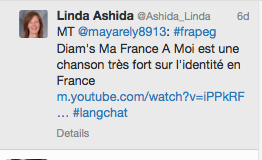
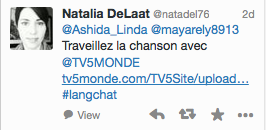
After students set up their Twitter accounts, we established our class hashtag #frapeg (French AP EG). Our unit’s theme was Personal and Public Identities, so I asked students to tweet out a favorite song dealing with identity. Some of them came up with some great things. One student, Arely M., even tweeted out an article (in English) that explained where her song came from and the political background behind it. To model the potential of learning beyond the classroom, Linda re-tweeted Arely’s tweet and soon it was viewed by a French Teacher who tweeted Arely and Linda with learning activities to go along with the song.

After visiting our class, Linda has continued to follow our class hashtag to encourage student participation. We would love it if you would follow our hashtag as well, and respond to student tweets, or retweet them, to encourage our collaborative learning beyond our room.