Showing posts with label Socrative. Show all posts

Tuesday, March 7, 2017

#214EdPrep: Spark Sessions for Formative Assessment

By: Rachel Barry

This is the second in a series of blog posts discussing the collaboration of the Collab Lab and our EG Ed Prep students.  Please follow along on our journey using the hashtag #214EdPrep or clicking on the label #214EdPrep in the word cloud!

Students in the District 214 Ed Prep Program will be competing in an "impromptu lesson" challenge among students from other schools.  For this competition, they will placed in groups to develop a lesson plan on a given a topic.  The Collab Lab will be following along and supporting our EG students through this process.

To give students ideas for this lesson, their teacher Kim Sander and I decided to provide the class with "Spark Sessions".  As a staff, we have used Spark Sessions at numerous teacher-led Institute Days to provide new instructional ideas, feedback methods, and brainstorming tools for teachers to use in their classrooms.  We figured a similar process would help ignite lesson ideas within the students.

On the first "Spark Sesson" day, I presented students with two different modes of formative assessment:  Classkick and Socrative.  

Spark Session 1:  Using Classkick to provide feedback to students

To begin, I had students enroll in a Classkick activity (code: QGT VY4) composed of Math, Human Geography, and English questions.  


The purpose of this activity included:
- to see the uses in multiple content areas
- to witness the impact of immediate feedback on learning
- to learn the ways that Classkick allows the teacher to differentiate your instruction based on student need
- to see how students can collaborate on the given problems
- to observe the classroom management benefits of using this method of formative assessment
- to add slides as students are working to extend their knowledge

To learn more about the uses of Classkick in the classroom, view this previous blog post.

Spark Session 2:  Using Socrative to provide feedback to students

Once students had experienced the open-ended feedback of Classkick, I had students log in to my Socrative Quiz.  This formative quiz consisted of Math, English, History, and Science questions all at the third grade level.  


Here, students were able to see:
- how to give students immediate feedback on multiple choice, true/false, and short answer questions
- how to use data to drive instruction
- how to provide students with an explanation when they answer incorrectly

View this blog post to see how Socrative can be used to provide immediate feedback to students.

Student Thoughts
I asked students which of these lessons they would most utilize in the classroom, and here were some responses:
"I really liked the Classkick and how you could have the students working and doing different problems while the teacher is helping other students and checking answers at the same time. I think it will be good for warm up problems as well as review for quizzes."

"I think in my future classroom I will use classkick for warm ups or formative assessments. I think it is effective and refreshing for students. It also provides an easier method of multitasking possibilities for the teacher."

"I could see class kick being used really well for certain subjects. And socrative useful for others. Both have ups and downs in the class room but both are useful."


-         "I think in the future I would use class kick because I think it is good way to have kids do work at their own pace and get help when they need. It helps shows the teacher what students still need help on." 


More blog posts to come.  Follow #214EdPrep and @EGCollabLab for more!

Thursday, January 7, 2016

Upgrading your student engagement tools

by Kirsten Fletcher

We've all struggled with the best way to get all students to participate. Here are a few tricks to give all students a voice in your class. Nothing revolutionary here, but a few good reminders.

Getting them to speak:
Non-tech: 
At the beginning of the semester, I used ask students to write their name on an index card and write a semester goal on the back. Then, throughout the semester, I would shuffle the cards and pull one every time I wanted students to participate. Students rarely argued because they could see I had chosen them randomly. I never put them on the spot without some prep though. I typically used the cards after a think-pair-share when I knew that everyone had something to say. I used the cards to group students quickly too.

With tech:
I now use Team Shake instead of the index cards, but it's basically the same thing. I refer to Team Shake as my "favorite app" and the students groan whenever I open it because they know they need to be prepared to contribute. This app costs $0.99, but it is worth the investment. Once I input my class rosters, I can randomly call on any student in the room. I usually project it on the screen so students can see that it's random. They also know that I'm not only going to call on the kids whose hands are always us, so they take the practice activities seriously just in case. Team Shake is also great for instantaneous grouping students and forming teams.


Randomly group students for classroom activities
Randomly select students to participate


Getting them to apply concepts: 
Non-tech:
My go-to activity for applying a new concept in writing is to ask students to write anonymously on paper or index cards.  Then I collect their writing samples and put a few up on the ELMO or read them so we can identify strengths and weaknesses. While this can be effective, it can also be time-consuming and I tend to lose the students in the shuffling of paperwork.

With tech:
Now, after I teach or review a tricky concept, I often ask my students to log into Socrative to write a sentence applying the new grammar, vocabulary, etc. When asking an open-ended question in Socrative, I choose to make answers anonymous. I project the answers and correct errors in front of the class, but no one knows whose work I am correcting. I find that students take greater risks when their work is anonymous and the discussion is richer. Often, the same mistakes are repeated multiple times, so I can quickly identify common misconceptions. By doing this activity in Socrative instead of on paper, I can give feedback after every question so students can correct their errors before the next question. There are also many other uses for the Socrative app, as outlined by this blog post by Rachel Barry.
Choose Short Answer to allow students
to write anonymous responses.
Display student responses for
immediate feedback.


Comprehension checks:
Non-tech:
For comprehension checks or skills practice, I used to pass out a set of mini white boards, markers, and erasers. I would then project a powerpoint or call out a question and have students write the answers. While this was somewhat effective, it was difficult to give meaningful feedback because students couldn't always see others' boards clearly.

With tech:
Today I do this same type of activity with Nearpod. The advantage of Nearpod is that it functions like an interactive powerpoint. I can frontload the activity with a few slides to review the concept I want to practice. Then I add "Draw it" slides where students can write their own answers. It is not anonymous, so it is best to do this once students are comfortable with one another. I project the teacher view as students work so that I can quickly flip through their answers and make corrections if necessary. If there is a good class rapport, students tend to get creative with their answers.
Students write original responses with
targeted grammar.
Teacher projects students' responses
for class discussion.


Nearpod also allows for multiple choice quizzes and other activities. After the activity, it is possible to print out results or run reports to get a clear picture of student understanding.
Results of Nearpod activities can be emailed to the teacher.


There are, of course, many other ways to engage students and allow their voices to be heard. See this blog post from Mark Heintz on Schoology discussions for more ideas.


Thursday, October 29, 2015

Peer Observation: Round 2 (Post 3/4)

Period 5

Christina Barnum invited us into her freshmen biology class.  They used Socrative as a self-assessment tool before starting a lab.  Socrative engaged the students because it provided instant feedback on content that would be needed to complete the lab.  


Period 6
Carmen Ruiz-Bergman invited us into her AP Spanish class.  They were discussing and learning about the commonalities and differences between Halloween and Dia de los muertos.  Students had studied the traditions of Día de los Muertos, but did not really know the history behind Halloween. Therefore they were asked to research and record their findings in Notability in order to write a cultural comparison between the target culture and their community.  Some of the pieces they looked at were:


A.  la historia

B.  la corrida

C.  la tumba / los cementerios

D.  "Trick or Treat"

E.  Tradiciones

F.  Etc.


Thursday, February 12, 2015

Socrative for Formative Assessment


Formative assessment is crucial for teachers to understand each student’s strengths and weaknesses as well as providing feedback prior to a summative assessment.  We have already discussed some tools for formative assessment in Mark Heintz's prior blog post, which discusses the use of Moodle and Schoology assessments to increase student motivation. I have also found that the data features of Socrative make it a great technology tool to foster immediate feedback to students while also providing teachers with a detailed report of both individual student and whole class performance.  

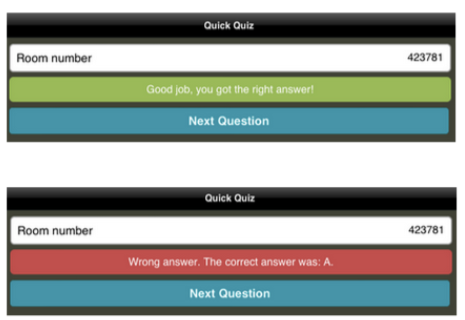
My PLT has created a worksheet of ten PLAN or ACT multiple choice questions per topic.  Socrative has been a great tool to convert these ten questions into an interactive tool while also providing students with immediate feedback:
Screen Shot 2015-02-05 at 2.05.38 PM.png


I find that this feedback fosters more questions with my students of how to get the correct answer. Students go back to look at what they did wrong, instead of just accepting their score out of ten.  The comments of “Oh I thought that was the right answer!”,  “Oh, I forget the negative sign!” or something of the sort are a regular occurrence.  The immediate feedback provides students with a quick reflection piece before moving on to the next question.

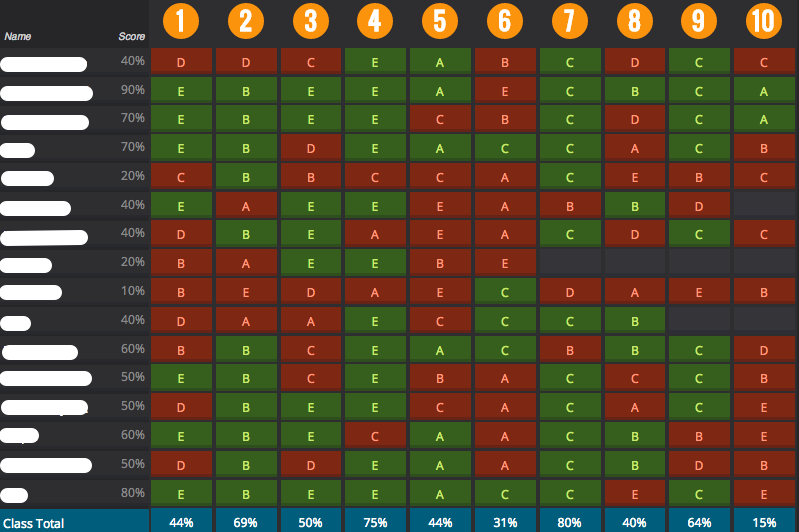
The live teacher report provides me with both individual and group information.  

Screen Shot 2015-02-09 at 2.32.56 PM.png

First, I am able to track my students’ paces. (Are they moving too quickly through the questions?  Should I have a conversation of time management with a student who spends too much time on one problem?) Next, I am able to target specific class needs, using the percentages of student success marked at the bottom. I use these percentages to determine which question(s) to go over with the whole class following completion of the activity as well as identify which skills I need to spiral back into the curriculum.  I also address individual student needs, especially in terms of multiple choice test-taking strategies.  Lastly, these reports are saved to your account, so I look back prior to unit tests, final exams, or when working over the summer on the course curriculum to target common mistakes with our population of students.

Thursday, December 11, 2014

Gamification of the classroom


Today the CollabLab welcomes Katie Owen, special education teacher at Elk Grove.  She can be reached @MsKatieOwen
 
I got an original Nintendo when I was 2. My dad bought me a Sesame Street game along with Blades of Steel. Now, years later, there are two things I know really well: my letters and how hockey is played.

I hear all of the time that kids these days do not go outside as much as they should and that video games teach them violence and bad behaviors. Educators and parents discuss how the flashes from the screen and fast paced movements are what cause students to have short attention spans and ADHD to be on the rise.

I hear all this, and yet I cannot help but think about all I learned from playing video games: 
  • Video games teach sequences, strategy, problem solving and logic.
  • Unlike passive activities (like TV), video games keep the mind active and alert.
  • Your hand-eye coordination, fine motor, spatial, and accuracy skills improve. You make decisions faster and think quicker. 
  • You become really good at multi-tasking and following/searching for multiple objectives.
  •  Video games got me (and students I know) reading more. Trust me. There are a lot of instructions on those screens.
  •  You learn to follow instructions (after you read them). 
  • You learn to plan ahead, manage resources (never run out of Mana), and spend your money wisely (as we have all learned when we have no more money for a Kevlar + Helmet).
  •  Which pretty much means you are learning some reading and math (sshhhhh don't tell the kids).
  •  And the one I like the most? You learn perseverance. The number one thing video games taught me is no matter how many times you need to try a level, you do not stop until you accomplish your goal.
For even more benefits and negative effects of video games, check out this site.

So now that I am a teacher, what does this all mean? This means that I am super excited about a new idea sweeping education: Gamification. Gamification is the idea of using game-related elements in non-game situations--for example, using things like levels, points, badges, and achievements in the classroom or your personal life.

This should have been our wedding cake.

We see this a lot already in our day-to-day lives. Foursquare is an app that lets you check-in to places and receive badges and points to compete with your friends. LoseIt is a weight-loss app that helps you set goals and gives you badge for accomplishments (like minutes working out, eating vegetables, etc). Mint.com is a website that helps you track your finances and gives you an achievement bar for savings goals. Duolingo is a website/app that teaches you languages through a gamification experience (it is really fun).

To get a quick start on gamification, try apps like ClassDojo (for behavior mangagement), Flashcards [⁛] (for vocabulary acquisition), or Socrative (for quizzes) to jumpstart gamification in your classroom!

To learn more and chat with other educators, try using the hashtag #gamification along with #edchat, #edtechchat, or #ipaded on Twitter.

For a fun infographic, visit: http://www.knewton.com/gamification-education/
An interesting TEDEd video: http://ed.ted.com/on/uk36wtoI
4 Ways to Bring Gamification into Your Classroom: http://blog.tophat.com/4-ways-to-gamify-learning-in-your-classroom/