Showing posts with label gamification. Show all posts

Monday, April 18, 2016

Competitive formative quizzes on-line

by Kirsten Fletcher

There are so many incredible resources out there to keep students engaged. Here is a brief overview of a few that I have tried recently.

Kahoot.it
This game is fast-paced and teacher-driven. Students are generally motivated by the competition, music, and running timer. See Rachel Barry's blog post for details on how it works.


Quizlet Live
A big shout-out to Rita Sayre who first presented this game to our staff at our last in-service day. Quizlet Live requires very little prep and is easy to use. The beauty of this game is that you don't have to create quiz questions because you can use flashcards that you have already created.

How to play:

  • Go to Quizlet.com and open a set of Flashcards. (It is possible to search and use flashcards created by others.)
  • Click the purple "Live" button
  • Students go to https://quizlet.com/live and type in the teacher's code. As students sign in, they are automatically assigned to a team.
  • Start the game.
Open any flashcard set and click "Live"

Students simply enter a game code at quizlet.live


How it works:

  • Quizlet Live assigns students to teams of 3-4. Students then move to sit with their team since the correct answer only appears on ONE team member's screen at a time.
  • Teacher computer can project the leader board. 
  • One wrong answer sends a team back to the beginning.
  • At the end of the game, team members see what they knew well and what they need to work on.
  • If you are trying to have small groups play (for stacked classes or stations), you must have at least 6 kids to play.

Quizalize.com
Thanks to my colleage at RMHS, Sara Kahle-Ruiz, for telling me about these next two resources. Like Kahoot, Quizalize allows you to create your own quizzes or search ones that have been created by other teachers. Some of the quizzes in their "marketplace" are free and others are paid.

Getting started:
  • Create an account at quizalize.com.
  • Search Marketplace or click Create a quiz
  • Make up a title. Add multiple choice questions and answers.
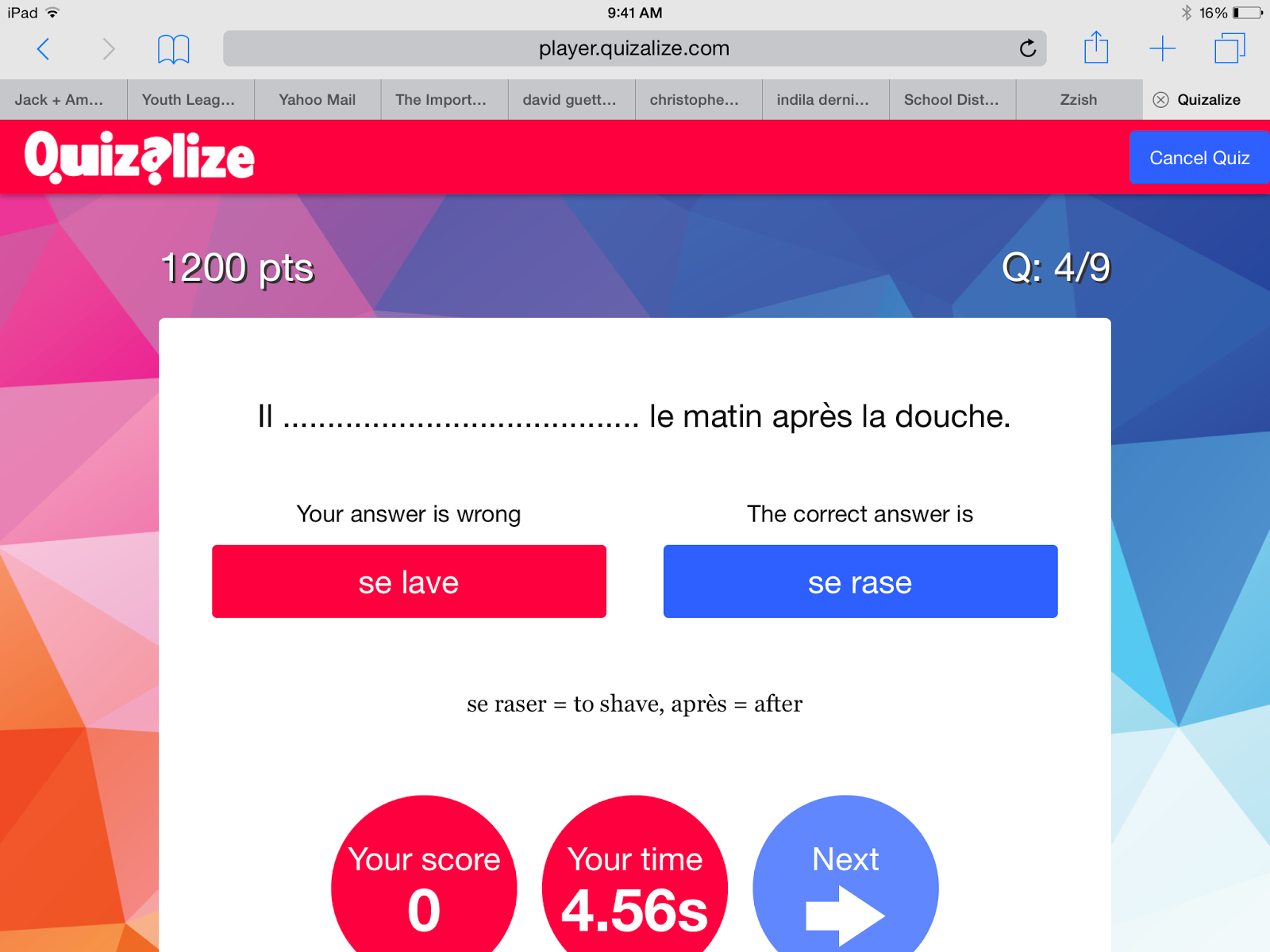
Students get feedback after every question
How to play:
  • Select a quiz and assign it to a class. (You need to create a class where students can sign in.)
  • You can also assign any quiz in Homework mode.
  • In homework mode, the teacher can click a "mastery" setting. Any question the student misses will be repeated (multiple times). 
  • Each class has its own code. Student's go to quiz.al and enter game code.
  • Students will be asked to enter their name. When they do, Quizalize saves it for next time. The second time they play, they will choose their name from a menu. Have students choose a name they will remember.
  • Start the game. In Homework mode, students start when they are ready. 
  • When a student gets a wrong answer, an explanation will appear if one was entered when creating the quiz.
Students get a summary of their responses at the end


Comments:
  • Quizalize now works through Zzish. It can be cumbersome to toggle between Quizalize and Zzish.
  • Both teacher and students can see a report at the end of their results. If they were working in "mastery" mode, the report shows how many attempts it took them to get an answer right.

Quizizz.com
Like other on-line quizzes, Quizizz allows you to create your own questions or search quizzes created by other educators.

Getting started:

  • Create a free account at Quizizz.com
  • Click on "Create" to begin your own quiz.
  • Click on "Public" to browse published quizzes. If you find one you like, you can duplicate it, then edit or play as-is with your class.
To play:
  • Log in to your account.
  • Click on "My Quizizz", select the one you want to play, and either click "Play live" or "Homework".
  • Students will be given a class code. They go to join.quizizz.com and enter the code. No need to make an account.


Assign any quiz as a game or homework.
Choose settings and select memes


Comments:
  • You can assign any quiz as an in-class game or homework
  • Quizizz gives each student an avatar. They need to enter a name. Since the name is displayed to all players, you may want to have them enter initials.
  • Kids can work at their own pace. Points depend on speed and accuracy. They can see the avatars of other students move across the screen as they answer.
  • Teacher can create memes for right and wrong answers. The funny memes that pop up after each response help keep kids engaged.
  • Students can see all questions at the end of game to evaluate how they did. Quizizz displays both their answer and the correct answer.
  • Reports are saved in your account so you can go back and view them when you want.
  • In homework mode, a student can repeat the quiz. A new avatar is assigned and they can race their previous score.

Students can see their results from their first try when they play again.

Students can see results from both attempts.


Have an idea for another on-line quiz? Please share!

Monday, February 22, 2016

Using Class Olympics to Motivate Students in ACT Practice

By: Rachel Barry

First off, I love the Olympics.  I believe that the Olympics motivates and unites people of various backgrounds in a common goal.  I enjoy the multitude of events, the rivalry and comradery of athletes, the interactions of people from multiple countries...I could go on and on.    So I thought, "Why not bring this to my classroom?"  

Now, I should preface this by noting that I have already tried implementing the Olympics in my classroom four years ago.  The first time around, I will be honest, I bit off more than I can chew.  I gave too many ways for students to win medals, I switched groups too often, and it became very cumbersome to keep up with.  

This year, I decided to develop the Winter Olympic Games focused around our weekly 10 ACT questions.  As part of our curriculum, we have created one set of 10 standardized-test questions for each of our skills.  Throughout first semester, students completed these either on paper or the Socrative app, but I could sense that students were getting bored by these methods.  This is why I chose to develop the Winter Games around these ACT questions, to re-engage my students when heading into the ACT.

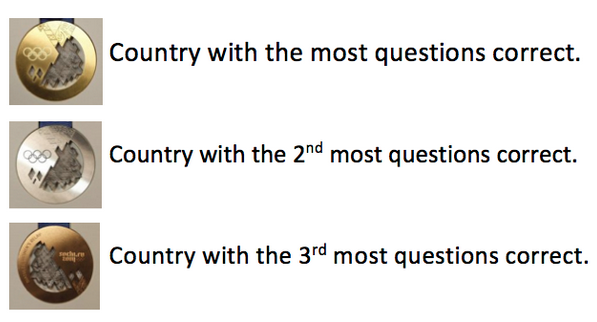
For the Games, I placed students into groups based on EPAS scores, so that the groups are balanced in ability.  Each group chose a country that they would be representing.  For the competition, students would work individually on the ACT questions for 8 minutes, and then have 3 minutes to discuss with their group members.  Upon completion of the 11 minutes, each country would submit one final set of answers.  The medals (gold, silver, broze) are awarded as such:

To add motivation each week, the team that gets a gold medal chooses candy from my candy bucket.  


The weekly medals get converted into points:

Gold = 3 points
Silver = 2 points
Bronze = 1 point

I'm keeping track of all of these scores in a GoogleDoc that is shared with my students on Schoology.  

In the end, the winning country gets to pick from a grab bag of items!


In the early stages of the Winter Olympics, I have found students taking these questions more seriously. I don't necessarily know whether this is due to the ACT date coming up in April, the ability to discuss with peers, or the rewards of candy and grab bag items, but I like that they seem to have a resurgence of motivation. I also find the conversations to be intriguing. Students are defending their opinions as to why they believe a question is correct, some students are explaining to others how to answer a problem, and some are just feeling more confident in their own abilities without second-guessing themselves. It is always really exciting to witness students helping one another out and fighting over correct answers in math problems!

Wednesday, September 2, 2015

Teaching Vocabulary/Root Words

by Katie Winstead (Owen)

In District 214, we teach students following the Word Within a Word curriculum. The lists we go through expose students to the various Greek and Latin root words they might come across in academic and nonacademic settings.


Vocabulary Research

To teach vocabulary (and our root words), I have been using the LINCS strategy from Kansas University. LINCS stands for:

L - List the parts (word and definition).
I - Identify a reminding word (or a word with the root word in it).
N - Note a LINCing Story (write a sentence with the reminding word and the definition).
C - Create a LINCing Picture (draw a picture to remind you of the definition and story).
S - Study and Self-Test.

This strategy works because it makes kids into active learners that have to think and word with words instead of drills in memorizing. By writing the definition, a sentence and a picture, students are creating multiple links in their memory to help them recall what the word means. For more on the LINCS Strategy and the research behind it visit: http://www.matsuk12.us/cms/lib/AK01000953/Centricity/Domain/100/SEPGrant/LINCing-LINCS Sherrifinal.pdf

Katie's Resources:
LINCS Strategy Presentation
LINCS Strategy Cheat Sheet
LINCS Strategy Student Notes
LINCS Strategy Student Quiz 


Vocabulary Instructional Practices

When I first started teaching Word Within a Word, the students did this on physical notecards. Once some iPads started trickling in to my classroom, however, I decided that I needed to transform how we have traditionally taught vocabulary. I modified our sheets to include a sentence with a reminding word in it, multiple examples of reminding words, as well as pictures to help students make predictions about what the root word meant.


The instructional sequence goes as follows:

1.    Students would get a sentence like this:
When learning how to drive, the instructor told me to stay on the right side of the median.

2.    Students would then need to find and underline the root word within the sentence.

3.    I then showed them a couple examples of words with the root word in it (median, mediocre, mediate) and two pictures like these:
 
4.    The class would work together to predict what the root word meant, and then I would show them the definition.

5.    The students would write down a reminding word they liked and could use in a sentence (if they struggled, they had my sentence as an example) along with the definition of the root word. The sheet looked like this:

6.    We then made note cards following the LINCS Strategy.


Here is what the whole PowerPoint presentation would look like:


For awesome Google Slide templates, check out this website: http://www.slidescarnival.com/


Modify and Redefine Vocabulary Acquisition

I taught this way and had students make note cards until one weekend when I decided to go through 20+ flashcard apps on my iPad. I tried Evernote Peek, Chegg Flaschards, StudyBlue (which I did use for a while), Flashcards Deluxe, Flashcards+, Flash-Cards, Cramberry, A+ Flashcards Pro, and eventually found the one I am in love with: Flashcards [] by NKO Ventures, LLC.

Flashcards [] allows you to create a class (in the free version you can have up to 30 students and 5 decks at a time). The students can join your class for free and copy the decks you have created. I start all of my decks with the root word on the front and the definition on the back. Students then add a reminding word on the right, and on the left they add a sentence. The app even allows students to either draw a picture or add one from their Camera Roll.


So what?

That is just where the vocabulary practice begins. Once students are done, there are many games the students can play. In the free version, that can be things like matching, true/false, and a crossword. In the paid Teacher Pro version ($49.99), you get 100 Students and 75mb of server space - along with games like Flappy Dog and Ninja! Students can also do Q-Battle and practice their vocabulary words in a competition.

When students practice on their own deck, they get to see the sentence and drawings they created. After they feel like they know the words, I have them practice on the class deck where they just see the root word and definition. This also allows them to compete and be on the top of the class leader board.

Friday, January 30, 2015

Lesson Sharing & School Culture

By Kim Miklusak

One of the things I like most about the school culture at EG is our willingness to share lesson ideas and instructional techniques with each other.  I've done two lessons this week that were introduced to me by my peers.

The first was a QR code pre-reading activity that was originally done at our Freshman First Days event at the start of the school year.  I then observed Bonnie Kale use it with her freshmen as a preview to reading Shakepeare; it was so well received by her students that other members of her freshmen team started using it as well!  Many members of our American Literature team are now using that idea this week to preview the concept of race and conflicts surrounding race in the US today as we begin preparing to read Huck Finn.  What was great about this activity was that it was self-paced but still skills-centered and incorporated current events and conflicts via articles and videos.


The second idea is the gamification of grammar practice, an idea long championed by Rita Sayre.  Today I did brackets to make a head-to-head competition.  Students worked by themselves or with a peer.  Each English grammar passage was a round.  The students put the number of correct answers plus an answer explanation as a tie breaker.  Even if they were kicked out in the first round they kept playing because the team with the next highest total came back in for the final round!  The students really got into it--even students who normally wouldn't be as interested in grammar.  Another great way to do this would be through Kahoot!

Thursday, December 11, 2014

Gamification of the classroom


Today the CollabLab welcomes Katie Owen, special education teacher at Elk Grove.  She can be reached @MsKatieOwen
 
I got an original Nintendo when I was 2. My dad bought me a Sesame Street game along with Blades of Steel. Now, years later, there are two things I know really well: my letters and how hockey is played.

I hear all of the time that kids these days do not go outside as much as they should and that video games teach them violence and bad behaviors. Educators and parents discuss how the flashes from the screen and fast paced movements are what cause students to have short attention spans and ADHD to be on the rise.

I hear all this, and yet I cannot help but think about all I learned from playing video games: 
  • Video games teach sequences, strategy, problem solving and logic.
  • Unlike passive activities (like TV), video games keep the mind active and alert.
  • Your hand-eye coordination, fine motor, spatial, and accuracy skills improve. You make decisions faster and think quicker. 
  • You become really good at multi-tasking and following/searching for multiple objectives.
  •  Video games got me (and students I know) reading more. Trust me. There are a lot of instructions on those screens.
  •  You learn to follow instructions (after you read them). 
  • You learn to plan ahead, manage resources (never run out of Mana), and spend your money wisely (as we have all learned when we have no more money for a Kevlar + Helmet).
  •  Which pretty much means you are learning some reading and math (sshhhhh don't tell the kids).
  •  And the one I like the most? You learn perseverance. The number one thing video games taught me is no matter how many times you need to try a level, you do not stop until you accomplish your goal.
For even more benefits and negative effects of video games, check out this site.

So now that I am a teacher, what does this all mean? This means that I am super excited about a new idea sweeping education: Gamification. Gamification is the idea of using game-related elements in non-game situations--for example, using things like levels, points, badges, and achievements in the classroom or your personal life.

This should have been our wedding cake.

We see this a lot already in our day-to-day lives. Foursquare is an app that lets you check-in to places and receive badges and points to compete with your friends. LoseIt is a weight-loss app that helps you set goals and gives you badge for accomplishments (like minutes working out, eating vegetables, etc). Mint.com is a website that helps you track your finances and gives you an achievement bar for savings goals. Duolingo is a website/app that teaches you languages through a gamification experience (it is really fun).

To get a quick start on gamification, try apps like ClassDojo (for behavior mangagement), Flashcards [⁛] (for vocabulary acquisition), or Socrative (for quizzes) to jumpstart gamification in your classroom!

To learn more and chat with other educators, try using the hashtag #gamification along with #edchat, #edtechchat, or #ipaded on Twitter.

For a fun infographic, visit: http://www.knewton.com/gamification-education/
An interesting TEDEd video: http://ed.ted.com/on/uk36wtoI
4 Ways to Bring Gamification into Your Classroom: http://blog.tophat.com/4-ways-to-gamify-learning-in-your-classroom/